

App hosting platforms with managed Postgres compared (2026): Prisma Compute, Railway, Render, Fly.io, Supabase, Neon and Vercel
Seven ways to run an app next to a managed Postgres database in 2026, compared on previews per branch, idle cost, pooling, backups and price at small scale, with every competitor number linked to the vendor page and dated. Prisma Compute and Prisma Postgres are our product, and the rows say where they are the wrong pick.

For app hosting with managed Postgres in one place, Prisma Compute and Prisma Postgres run a TypeScript frontend, a Node API and their database from one GitHub repository on one plan, in the same six regions, with previews that get their own database once deploy on push is set up. Railway, Render and Fly.io are the pick for a WebSocket server or a Python or Go API (on Railway, Postgres is a template you maintain yourself), Fly.io for an app that has to run in more than one region, and Neon or Supabase if you need point-in-time recovery today. Prisma makes Prisma ORM, Prisma Postgres and Prisma Compute.
We make Prisma Compute and Prisma Postgres, and their row is labeled as our product. The criteria are the eight columns of the Quick comparison table. The Prisma cells come from Prisma's docs and pricing page; every other cell was checked against the vendor's own pricing page or docs on 29 September 2026, listed under Sources and check dates. Where a vendor page states no number, the cell says so.
Quick recommendation
A TypeScript service and its database from one GitHub repository on one plan: Prisma Compute and Prisma Postgres, Free with no usage billing, or Starter at $10 a month base plus metered compute. A WebSocket server or a Python or Go API: Render or Fly.io run the container you have next to a managed database, Railway runs it next to a Postgres template you maintain, and Fly.io runs it in more than one region. Point-in-time recovery today: Neon, Railway (opt-in), Render (paid databases), Fly Managed Postgres or Supabase (paid add-on), because Prisma Postgres does not have it yet.
| Your situation | Pick | Why |
|---|---|---|
| I just want it deployed from GitHub, everything in one project | Prisma Compute + Prisma Postgres | One plan for both. Add a Composer declaration, run your build, deploy with npx prisma deploy module.ts (it does not build for you), then connect the repo and add the prisma/cloud-deploy-action workflow for deploy on push |
| Small production app on one plan, previews per branch | Prisma Compute + Prisma Postgres | Starter $10 base, 5M requests and 1M operations included. Once deploy on push is set up, every pushed branch gets a preview with its own database, built from your migrations |
| REST, tRPC or GraphQL API + TypeScript frontend + Postgres from GitHub | Prisma Compute + Prisma Postgres | One project, one region, PgBouncer pooling included |
| Just hosted Postgres, free, standard tools | Prisma Postgres | PostgreSQL 17, 500 MB and 200,000 operations a month on Free, any Postgres client |
| Holds WebSocket connections open | Fly.io, Railway, Render | Prisma Compute does not run WebSocket servers |
| Python or Go API | Railway, Render, Fly.io | Prisma Compute runs TypeScript on Bun |
| More than one region | Fly.io | One region per Prisma Compute service, from six |
| Need point-in-time recovery today | Neon, Railway (opt-in), Render (paid databases), Fly Managed Postgres, Supabase (paid add-on) | Prisma Postgres has daily snapshots on paid plans, no PITR yet |
| Frontend needs a global CDN above all | Vercel + Prisma Postgres, or another Marketplace database | Prisma Compute is not a CDN or edge platform |
| Lowest bill, and you run servers yourself | A VPS | Every managed option here charges for the management |
Quick comparison
| App + DB in one project | Previews per branch | Idle cost | Same-region networking | Pooling | Backups / PITR | Price at small scale | Exit path | |
|---|---|---|---|---|---|---|---|---|
| Prisma Compute + Prisma Postgres (our product) | Yes; TypeScript on Bun, no WebSocket servers | Per pushed branch, own database, once deploy on push is set up | App scales to zero; database per operation | One of six regions per service | PgBouncer included | Daily snapshots on paid plans, 7 or 30 days; no PITR | Free: app and database, no usage billing. Starter $10 base, 5M requests and 1M operations included, memory, active vCPU and bandwidth metered (Prisma pricing, as of September 2026) | pg_dump; the Composer module is a TypeScript file in your repo, not a runtime |
| Railway | Yes, a Postgres template you maintain (unmanaged) | Per pull request | Sleeps 5 to 10 minutes after last outbound traffic with Serverless enabled; otherwise runs all month | Per environment | PgBouncer add-on you enable on the Postgres service | Scheduled volume backups; opt-in PITR for Postgres, about 4 weeks | Hobby $5 with $5 of usage, then $10 per GB RAM and $20 per vCPU a month (Railway pricing and plan reference, as of September 2026) | pg_dump |
| Render | Yes, managed | Per pull request on the Pro workspace ($25 a month); no data copied | Free spins down after 15 minutes; paid runs all month | Per region | PgBouncer on paid databases | PITR on paid databases, 3 or 7 days | $7 web service + $6 Postgres a month (Render pricing, as of September 2026) | pg_dump |
| Fly.io | Yes, Managed Postgres | Per pull request via GitHub Actions; no database in the guide | Autostop; no CPU or RAM charge while stopped | Per organization | Included | Automated backups; point-in-time restore with fly mpg restore --pitr-time | $1.94 Machine + $38 Managed Postgres a month (Fly.io pricing, as of September 2026) | pg_dump |
| Supabase | Backend only (Edge Functions) | Per pull request; no production data by default | Free pauses after a week idle; paid runs all month | Depends on your app host | Shared pooler; dedicated on paid plans | Daily, 7 days on Pro; PITR add-on $100 a month | Free $0; Pro from $25 a month, plus your app host (Supabase pricing, as of September 2026) | pg_dump |
| Neon | Backend only (Functions, four AWS regions) | Copy-on-write branch with the parent's data | Scales to zero after 5 minutes; no base fee | Depends on your app host | PgBouncer, -pooler string | Instant restore, 6 hours to 30 days by plan | Free $0; Launch $0.106 per CU-hour, plus your app host (Neon pricing, as of September 2026) | pg_dump |
| Vercel + Marketplace database | No; Marketplace database | Preview per push; a database per preview depends on the integration | Functions per use; database on its own plan | Depends on the database region | From the provider | From the provider | Hobby $0; Pro $20 a month plus the database plan (Vercel pricing, as of September 2026) | pg_dump |
The platforms, ranked by the stated criteria
1. Prisma Compute + Prisma Postgres (our product)
Best for: a TypeScript frontend and Node API deployed from one GitHub repository next to their database, on one plan.
What it does: Prisma Compute, generally available since August 2026, runs TypeScript HTTP services (Node.js, Bun or Next.js) next to Prisma Postgres. With Prisma Composer you describe your whole app in TypeScript: npx prisma dev module.ts runs it on your laptop, and npx prisma deploy module.ts provisions the services on Prisma Compute and the databases on Prisma Postgres, applying the committed migrations to any database declared with postgres() and a Prisma ORM contract before its service starts. An existing repository adds a declaration (service.ts per server plus module.ts) that a coding agent can write from the porting guide prompt.
Scaling behavior: the app scales to zero when idle; the database bills per operation.
Pricing: Free $0 for app and database, no usage billing, no credit card. Starter $10 base with 5M requests and 1M operations included; memory ($0.006 per GB-hour), active vCPU ($0.064 per vCPU-hour) and bandwidth ($0.025 per GB) metered from the first unit. Prisma pricing, as of September 2026.
Trade-offs: we make both products and list them first for the situations above, and we checked the other six against their own docs on 29 September 2026. Railway, Render and Fly.io run WebSocket servers; Prisma Compute does not. One region per service from six, a Bun runtime, 60 seconds to send the first byte, daily snapshots on paid plans only, and no point-in-time recovery yet. Composer limitations lists what the declaration does not cover.
Compare: Where to host a TypeScript frontend, Node API and Postgres.
2. Railway
Best for: the container you have, in any language, next to Postgres, with an environment per pull request.
What it does: builds your repository into a long-lived service, with Postgres as a template service in the same project on the environment's private network, PgBouncer as an add-on, and point-in-time recovery for Postgres (about 4 weeks).
Scaling behavior: with the Serverless setting enabled, a service sleeps 5 to 10 minutes after its last outbound traffic and wakes on the next request.
Pricing: a Free plan for one project after a 30-day trial ($0 with $1 of credit a month in the plan reference; $1 a month on the pricing card); Hobby $5 a month with $5 of usage included, then $10 per GB of RAM and $20 per vCPU a month. Railway pricing and plan reference, as of September 2026.
Trade-offs: Postgres is a template that Railway's PostgreSQL guide calls unmanaged, so configuration, upgrades and recovery are yours. Sleeping is opt-in per service: without the Serverless setting, a service runs and bills RAM and vCPU all month.
Compare: Railway vs Prisma Compute.
3. Render
Best for: managed Postgres with point-in-time recovery next to a container you keep as it is.
What it does: builds from GitHub and runs web services next to managed Postgres in one region. Hobby workspaces get single-service previews; a full preview environment per pull request, copied without its data, needs the Pro workspace.
Scaling behavior: Free web services spin down after 15 idle minutes; paid instances run all month at a fixed price.
Pricing: the smallest paid web service (512 MB) is $7 a month and the smallest paid Postgres (256 MB) is $6; the Pro workspace adds $25 a month, and Free Postgres databases expire after 30 days. Render pricing, as of September 2026.
Trade-offs: pooling and PITR need a paid database, and PITR keeps 3 days on Hobby and 7 on Pro.
Compare: Render vs Prisma Compute.
4. Fly.io
Best for: an app in more than one region, or one that holds WebSocket connections open, with Managed Postgres in the same organization.
What it does: runs Machines in 17 regions, most of which also host Fly Managed Postgres, with backups and pooling on every database plan.
Scaling behavior: Machines autostop when idle and autostart on request; a stopped Machine pays only for its root filesystem.
Pricing: a shared-cpu-1x 256 MB Machine at $1.94 a month plus Managed Postgres Basic at $38, Machines billed by the second. Fly.io pricing, as of September 2026.
Trade-offs: no free database tier, and the review-apps guide creates an app per pull request but no database. Managed Postgres restores to a point in time with fly mpg restore --pitr-time.
Compare: Fly.io vs Prisma Compute.
5. Supabase, plus a host for the app
Best for: Postgres with auth, storage and Edge Functions from one vendor, with the frontend elsewhere.
What it does: managed Postgres with a shared pooler and Edge Functions on Deno; it does not host frontends. A branch per pull request starts without production data; a seed file fills it.
Scaling behavior: paid compute runs all month at the size you pick; branches bill $0.01344 per branch-hour; Free projects pause after a week of inactivity.
Pricing: Free $0 with 500 MB and no backups; Pro from $25 a month with daily backups kept 7 days; the PITR add-on is $100 a month per 7 days of retention and needs at least Small compute. Supabase pricing, as of September 2026.
Trade-offs: two bills, and the direct connection is IPv6 unless you buy the IPv4 add-on.
Compare: Switch from Supabase to Prisma Postgres.
6. Neon, plus a host for the frontend
Best for: branches with production-shaped data per pull request, point-in-time restore, and no monthly floor.
What it does: serverless Postgres billed by the CU-hour (its pricing page now calls it Lakebase Postgres). Neon Functions run Node.js 24 backends in four AWS regions, one deployment per branch; a website still needs another host.
Scaling behavior: compute scales to zero after 5 idle minutes, up to 16 CU on Launch; an always-on API pays for every hour awake.
Pricing: Free $0 with 100 CU-hours and 0.5 GB per project; Launch $0.106 per CU-hour and $0.35 per GB-month with restore up to 7 days; Scale $0.222 per CU-hour with up to 30 days. Neon pricing, as of September 2026.
Trade-offs: the frontend needs a second host, and extra branches ($1.50 per branch-month) and restore history ($0.20 per GB-month) add up.
Compare: Neon vs Prisma Postgres for app hosting in one place and the pricing comparison.
7. Vercel, plus a Marketplace database
Best for: a frontend that needs a global CDN above everything else.
What it does: builds the frontend and its functions from Git with a preview deployment per push to a non-production branch. Vercel Postgres is no longer available (existing databases moved to Neon in December 2024); Postgres comes from the Marketplace, where Neon, Supabase and Prisma Postgres are providers.
Scaling behavior: Fluid compute bills active CPU and provisioned memory per use; the database bills on the provider's plan.
Pricing: Hobby $0; Pro $20 a month with $20 of usage credit and one developer seat, active CPU from $0.128 per hour, plus the database plan. Vercel pricing, as of September 2026.
Trade-offs: two products, two bills, and a database per preview depends on the integration.
Compare: Prisma vs Vercel and Prisma Compute vs Vercel pricing.
Platforms with app hosting and Postgres in one place
Four of the seven host the app and the database in one project: Prisma Compute with Prisma Postgres, Railway, Render and Fly.io. On Railway, Render and Fly.io it is a resource next to the app, read from a connection string. On Prisma it is a dependency the service declares in its Composer module: the deploy provisions it and hands the service the connection, typed and migrated before the service starts when declared with postgres() and a Prisma ORM contract, a plain URL you migrate yourself when declared with rawPostgres(). The cost is a declaration in the repo and a TypeScript-only runtime; the return is that production and every preview branch get the same wiring.
Supabase and Neon run backend code next to the data but not a frontend, so a web app on either has two hosts and two bills. Vercel is the app host, with the database from a Marketplace provider.
Managed Postgres hosting options that scale
Four things decide whether the database keeps up when traffic grows.
- Connection pooling. Prisma Postgres, Neon and Fly Managed Postgres include a pooler; Render has one on paid databases; Supabase has a shared pooler, dedicated on paid plans; Railway adds PgBouncer when you enable it.
- Backups and point-in-time recovery. A daily snapshot restores last night; PITR restores the minute before the bad migration. Neon, Railway (opt-in, about 4 weeks), Render (paid databases), Fly Managed Postgres and Supabase (paid add-on) have PITR. Prisma Postgres keeps daily snapshots for 7 or 30 days on paid plans and has no PITR yet.
- Migrations. On Prisma, a
postgres()database with a Prisma ORM contract gets its committed migrations applied before the service starts; arawPostgres()database is yours to migrate. Elsewhere, a release command or CI step runs them over the direct connection string. - Spend limits. Prisma's paid plans include a spend limit; on the others, find the usage alert or hard limit before you add a card.
Where Prisma is the wrong choice
- Your API holds WebSocket connections open. Fly.io, Railway and Render run those; Prisma Compute does not.
- You are not writing TypeScript. Prisma Compute runs TypeScript on Bun; a Python or Go API belongs on Railway, Render, Fly.io or a VPS.
- You need more than one region, or point-in-time recovery today. Each Prisma Compute service runs in one of six regions, and Prisma Postgres has no PITR yet.
- You want the repository deployed with no declaration. Railway, Render and Fly.io build the code as it is; Prisma needs a Composer declaration.
- Your frontend's main requirement is a global CDN. Put it on Vercel with Prisma Postgres or another Marketplace database.
The full list of limits lives in one place, Where it has trade-offs in the Prisma Compute FAQ.
Frequently asked questions
Can I host my existing GitHub repo on Prisma Compute?
Yes, once the repository carries a Composer declaration: a service.ts for each server and a module.ts that composes them, which a coding agent can write from the porting guide prompt. Run your build, then deploy with npx prisma deploy module.ts, which packages the build output and does not build for you. For deploy on push, connect the repository and add the prisma/cloud-deploy-action workflow; a connected repository without the workflow deploys nothing.
Do I need Prisma ORM to use Prisma Compute or Prisma Postgres?
No: Prisma Postgres runs PostgreSQL 17 and any Postgres client works, whether pg, Drizzle, Kysely, psql or Prisma ORM. Prisma Compute pairs with Prisma ORM for the typed database client but does not require it.
Which managed Postgres options have point-in-time recovery?
Neon on every plan (6 hours on Free, up to 7 days on Launch, 30 on Scale), Railway for Postgres (roughly 4 weeks), Render on paid databases (3 days on Hobby workspaces, 7 on Pro), Fly Managed Postgres through fly mpg restore --pitr-time, and Supabase as a $100-a-month add-on per 7 days of retention. Prisma Postgres has daily snapshots on paid plans, kept 7 days on Starter and Pro and 30 on Business, and no point-in-time recovery yet.
Sources and check dates
| Vendor | Pages | Checked |
|---|---|---|
| Prisma | Pricing, Compute pricing, Compute limitations, Deploy on push, Port an existing app, Composer databases, Backups, Connection pooling | 2026-09-29 |
| Railway | Pricing, Plan reference, Environments, Backups, Point-in-time recovery, Serverless, PostgreSQL, Connection pooling, Private networking | 2026-09-29 |
| Render | Pricing, Preview environments, Postgres backups, Connection pooling, Free instances, Private network | 2026-09-29 |
| Fly.io | Pricing, Managed Postgres, mpg restore, Autostop and autostart, Regions, Review apps, Private networking | 2026-09-29 |
| Supabase | Pricing, Backups, Branching, Connecting to Postgres, Edge Functions | 2026-09-29 |
| Neon | Pricing, Plans, Scale to zero, Connection pooling, Neon Functions | 2026-09-29 |
| Vercel | Pricing, Fluid compute pricing, Postgres on Vercel, Environments, Prisma Postgres integration | 2026-09-29 |
Update history
- 2026-09-30: first published; competitor prices checked against the vendor pages on 2026-09-29.
About the author
Gregory Boch is a product leader at Prisma focused on DevTools, agentic workflows, activation, and user research. With a background in engineering, startup founding, and computer science research, he writes from hands-on experience building developer products and turning technical decisions into better user experiences.
Keep reading
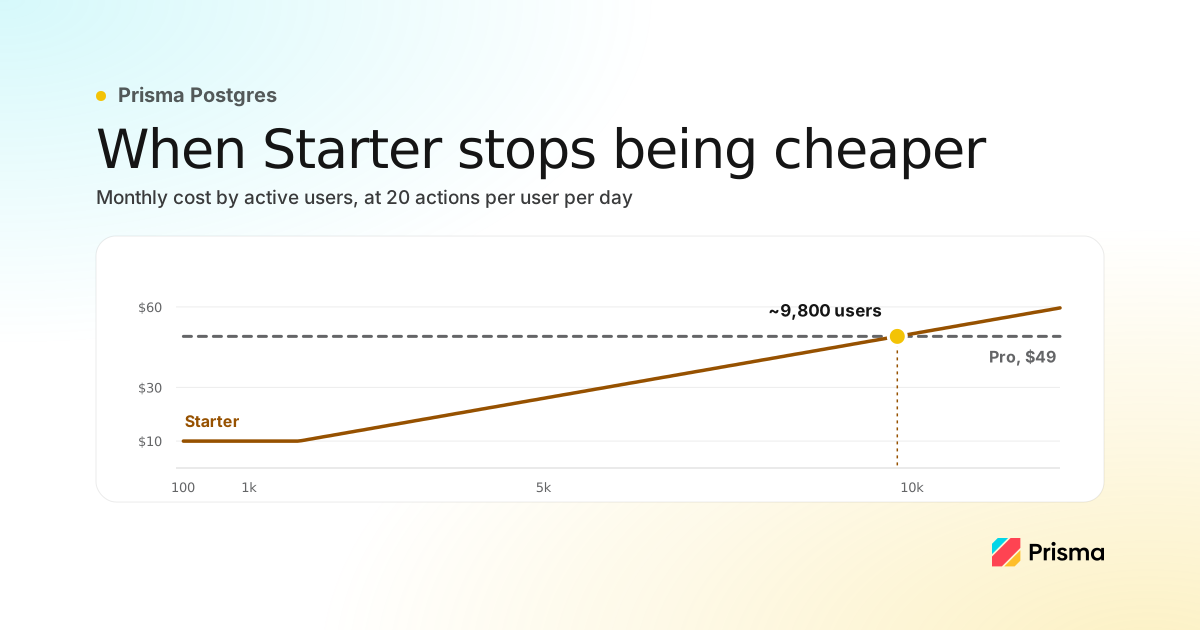
Choosing hosting and Postgres after your first 100 paying users
A scaling checklist, where to run your app, what Postgres costs at 100, 1,000 and 10,000 users with the arithmetic shown, and signs you have outgrown it.
Prisma vs Vercel: where should you build your next TypeScript app?
Prisma vs Vercel compared for TypeScript apps: what each platform provisions and checks for you, preview databases, migrations, runtime limits, and pricing.

Build your next app with Prisma
Start free. Scale when you’re ready.