

Deploy Prisma Apps with create-prisma
create-prisma now scaffolds Compute-ready Prisma apps with prisma.compute.ts, compute:deploy, Prisma Postgres, and Prisma Skills add-ons.

create-prisma now scaffolds apps that deploy to Prisma Compute out of the box.
Run the initializer, pick a Compute-ready template, and the generated project can include:
- Prisma schema, client helper, seed file, database scripts, and env file
prisma.compute.tswith the app's Compute defaults- Prisma Postgres setup, when selected
- Prisma Skills, the Prisma MCP server, and editor add-ons, when selected
- a
compute:deployscript for later deploys
bun create prisma@stable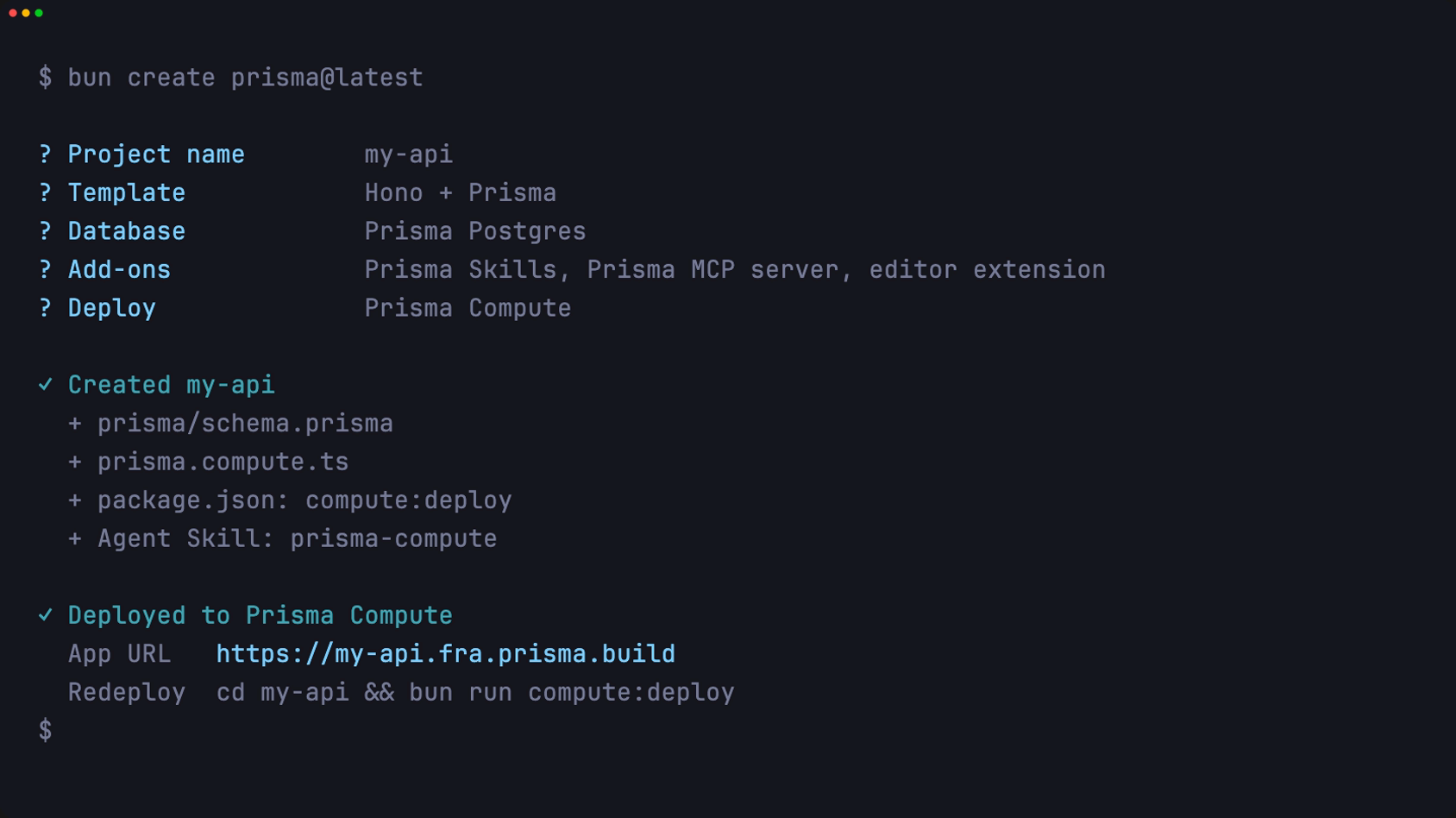
The deploy config it writes for you
For Compute-ready templates, the scaffold and the deploy defaults live in the same repo. The generated env file, app name, port, and framework drive the first deploy and every redeploy after it.
For a Hono app, create-prisma writes a config like this:
import { defineComputeConfig } from "@prisma/compute-sdk/config";

export default defineComputeConfig({
  app: {
    name: "my-api",
    framework: "hono",
    httpPort: 8080,
    env: ".env",
  },
});
That file is the whole deploy contract. For a closer look at it, including how it scales to monorepos, see Configure Prisma Compute deploys in TypeScript.
Add-ons that set your agent up
The add-ons are optional, but the Skills add-on changes how an agent works with the repo. It installs Prisma Agent Skills from prisma/skills, including the prisma-compute skill for deploys, logs, domains, and the rest of the Compute workflow.
With that in place, your agent already knows how to change the app and redeploy it. You don't have to spell out the steps in every prompt.
Redeploying after a change
A project created with create-prisma ships with prisma.compute.ts and a compute:deploy script.
After you make a change, redeploy from the project:
cd my-api
bun run compute:deploy
The script redeploys your app code using the defaults in prisma.compute.ts. Database provisioning and migrations stay outside the deploy script.
For an app you didn't scaffold, call the Prisma CLI directly:
bunx @prisma/cli@latest app deployWhere to go next
create-prisma gets you from nothing to a deployed app and database in one command, with the config already wired up. From here:
- Read Configure Prisma Compute deploys in TypeScript to understand
prisma.compute.tsand monorepo deploys in depth. - Follow the deploy quickstart to take the generated app to a live URL.
- Browse the Prisma Compute docs for branching, environment variables, and the full CLI reference.
Compute includes 1M requests a month on the Free plan. It runs your app on the same infrastructure as Prisma Postgres, which has a generous free tier of its own, so the project you scaffold today already has somewhere to run. Tell us what you build in #prisma-compute on Discord.
About the author
Aman is a member of the Prisma team and the creator of Better-T-Stack, an open source scaffolding tool that developers use to spin up more than ten thousand TypeScript projects every month. He writes about TypeScript, full-stack development, and getting projects from idea to production quickly.
Keep reading

The Prisma Data Platform is now Generally Available
The Prisma Data Platform solves problems developers face when working with databases in production, and is now generally available.

Serverless Postgres: How It Works and How to Choose a Provider
Serverless Postgres separates compute from storage and bills for usage instead of provisioned servers. How scale-to-zero, cold starts, and the three pricing models compare across Neon, Prisma Postgres, Supabase, Aurora, and PlanetScale.

Build your next app with Prisma
Start free. Scale when you’re ready.