

Make Your Applications Fast Globally

Modern serverless and edge runtimes have made it easier than ever to deploy fast, scalable applications. But as apps grow more distributed, performance issues often shift away from code, and toward infrastructure.
This post explores common backend bottlenecks that sneak into globally distributed apps: long database round-trips, connection churn, cold starts, and inefficient queries. It also walks through practical solutions like pooling, caching, region-aware deployment, and smarter monitoring—so your app stays fast, no matter where your users are.
What edge and serverless really mean
Before we dive in further, let’s quickly define the landscape.
Serverless means you write a function, deploy it, and your cloud provider runs it on-demand. You don’t think about infrastructure. It scales up and down automatically.
Edge means those functions run close to your users. Your code might run in Tokyo for users in Japan, or Frankfurt for users in Germany. That cuts physical distance, which cuts latency.
This is great for frontend responsiveness and lightweight APIs—but it introduces new challenges behind the scenes.
Why stateless functions complicate things
One of those challenges is that serverless and edge functions are stateless. They don’t keep state between requests. So every time a request comes in, a new instance might be spun up, with no persistent connection to your database.
This leads to a problem known as connection churn: hundreds of new connections being opened and closed rapidly.
If 1000 users hit your function at once, that’s 1000 database connections in a short span. Most databases aren’t built for that. You hit connection limits, your DB starts throttling, and everything slows down.
Cold starts compound this issue. If a function hasn’t been used recently, the first request is slower while the runtime spins up and establishes a fresh connection.
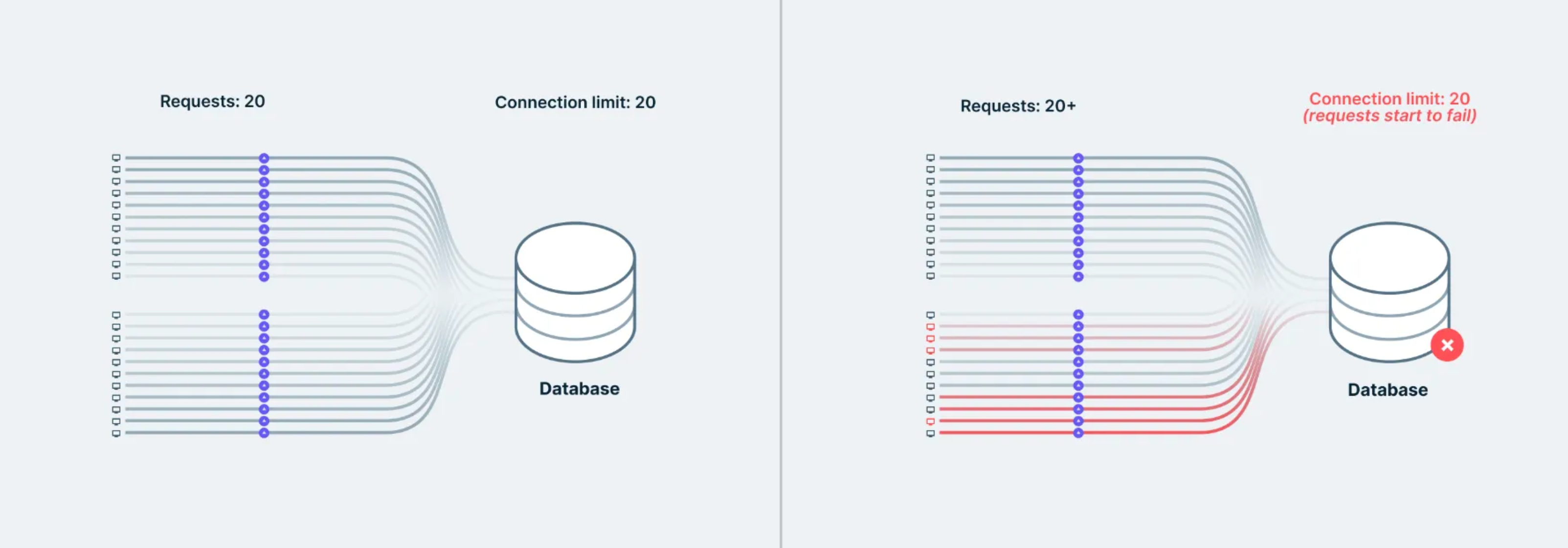
Use connection pooling
The fix? Connection pooling.
Connection pooling lets multiple function invocations share a small, persistent set of connections. It acts as a queue in front of your database. Instead of each function opening a new connection, it grabs one from the pool.
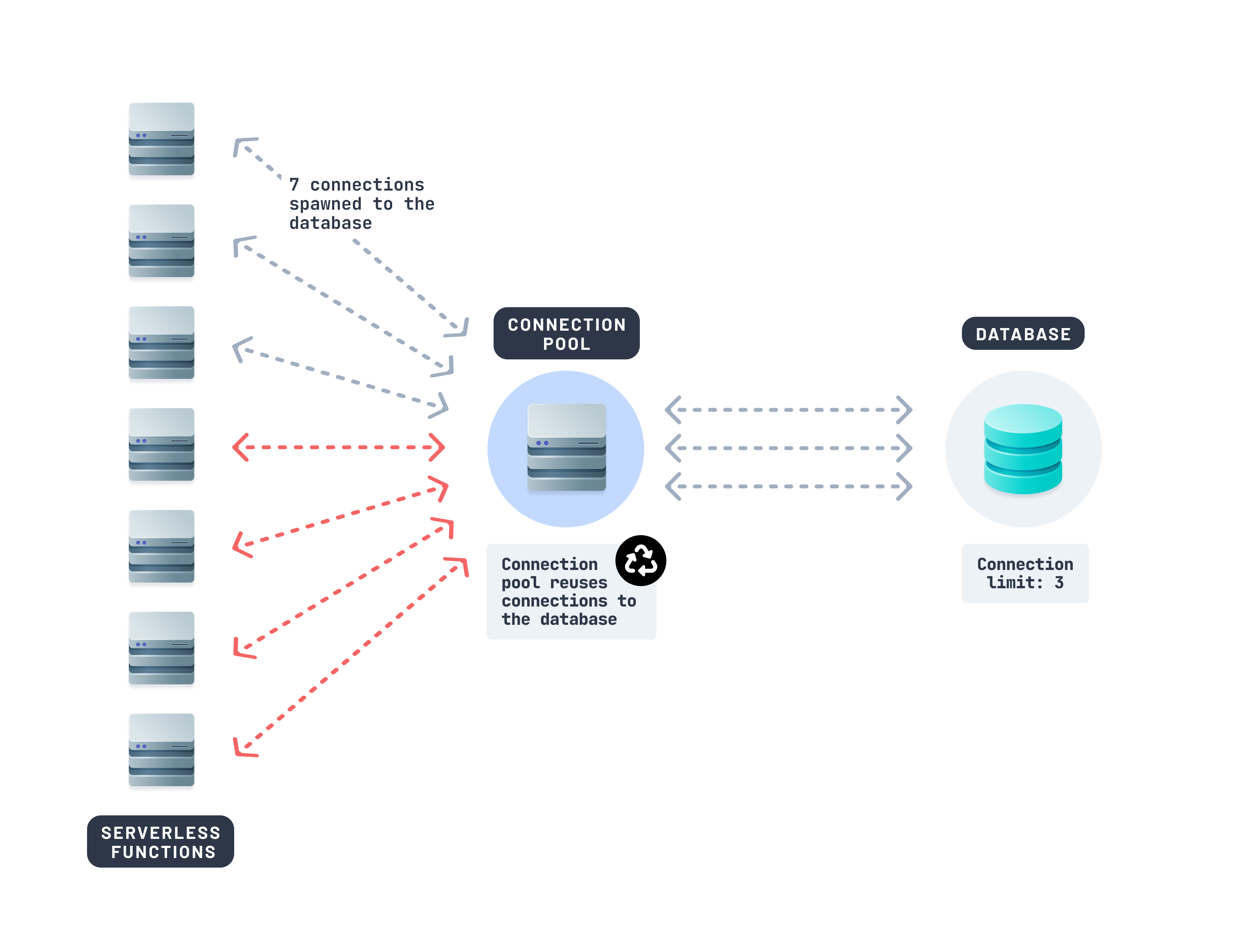
If you're using a database like Prisma Postgres, connection pooling is handled behind the scenes—automatically pooling and optimizing queries across functions. Other tools like PgBouncer or Supavisor (from Supabase) can also be useful.
Using a connection pooler for your database alone can stabilize performance in high-traffic edge environments.
At this point, we’ve tackled how to manage too many connections. But there’s another hidden culprit behind slow edge performance.
Your edge app isn’t slow, the roundtrip to your database is
Imagine you deploy your edge function to Tokyo. It runs lightning fast—until it calls a database in Virginia. Suddenly, your response time jumps by 500ms.
It’s not your code. It’s the geography.
Edge runtimes are fast, but if your function has to query a database across an ocean, each request adds hundreds of milliseconds in round-trip latency. Multiply that across several queries, and the user experience suffers.
Let’s explore how to fix that.
Cache data that doesn’t need to be real-time
One of the easiest ways to reduce unnecessary database calls is to cache data that doesn’t change often.
Think: product lists, site settings, or feature flags. These values don’t need to be fetched fresh every time.
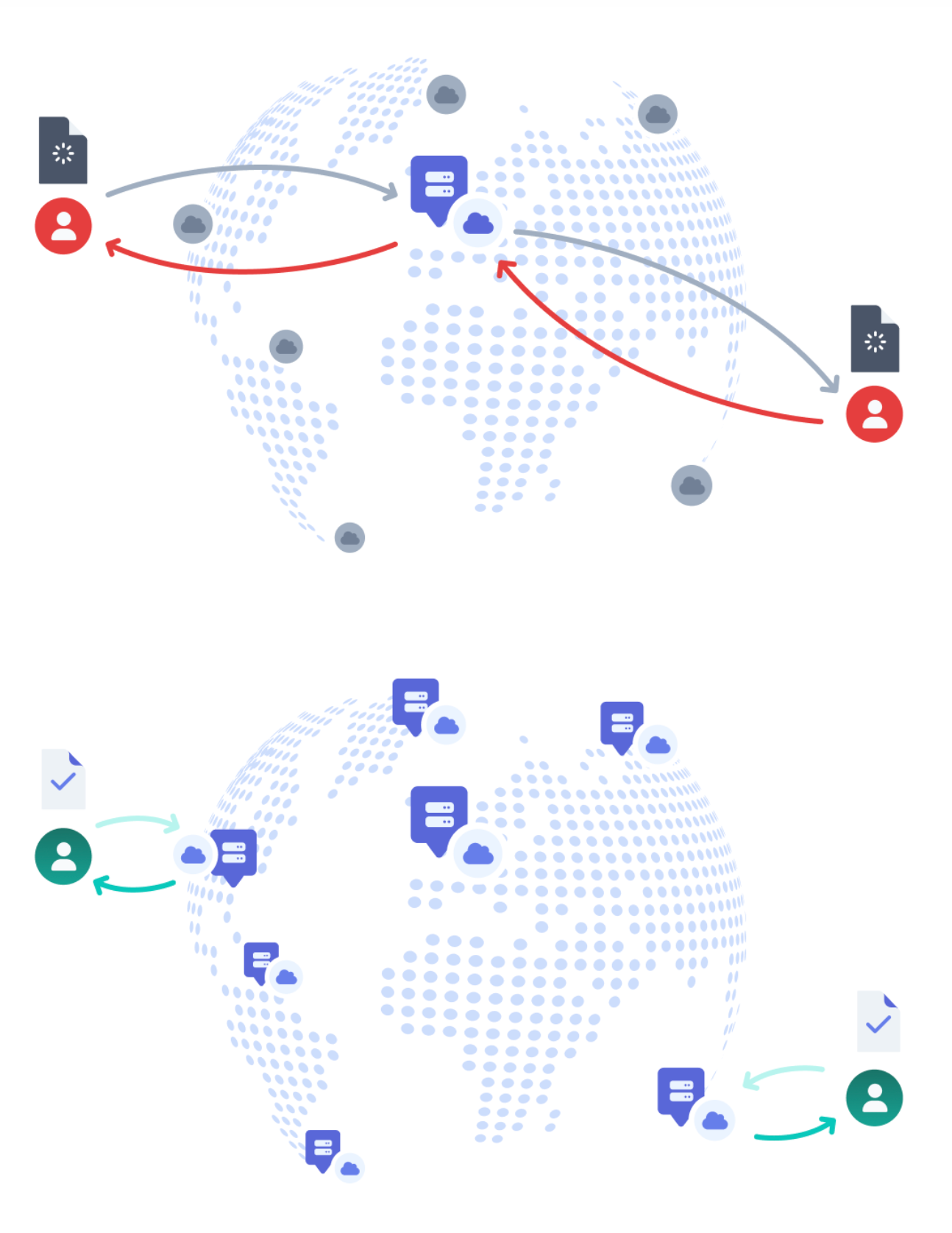
You can cache database queries using:
- CDN-level caching with proper
Cache-Controlheaders - Edge key-value databases (like Vercel KV, Cloudflare Workers KV)
- In-memory caching inside warm serverless functions
- Use a database provider with built-in caching such as Prisma Postgres
Caching lightens the load on your database and cuts down round-trip times for repeated requests significantly.
Colocate your function and your database
Another way to make your API faster is to run your code and your database in the same region.
Let’s say your database is hosted in us-east-1 (Virginia). But your edge function is invoked from Tokyo. If the function runs close to the user (e.g. in ap-northeast-1), but the database is across the Pacific in the U.S., every query has to make a long-haul network round-trip—multiple times.
That’s where latency can add up fast.
Here’s what the function might look like:
export const config = {
  runtime: 'edge',
}

export default async function handler(req: Request) {
  const user = await db.user.findUnique({ where: { id: req.id } })

  if (!user) {
    return new Response(JSON.stringify({ error: "User not found" }), { status: 404 })
  }

  const orders = await db.order.findMany({ where: { userId: user.id } })

  if (!orders || orders.length === 0) {
    return new Response(JSON.stringify({ error: "No orders found" }), { status: 404 })
  }

  const settings = await db.setting.findFirst({ where: { userId: user.id } })

  return Response.json({ user, orders, settings })
}
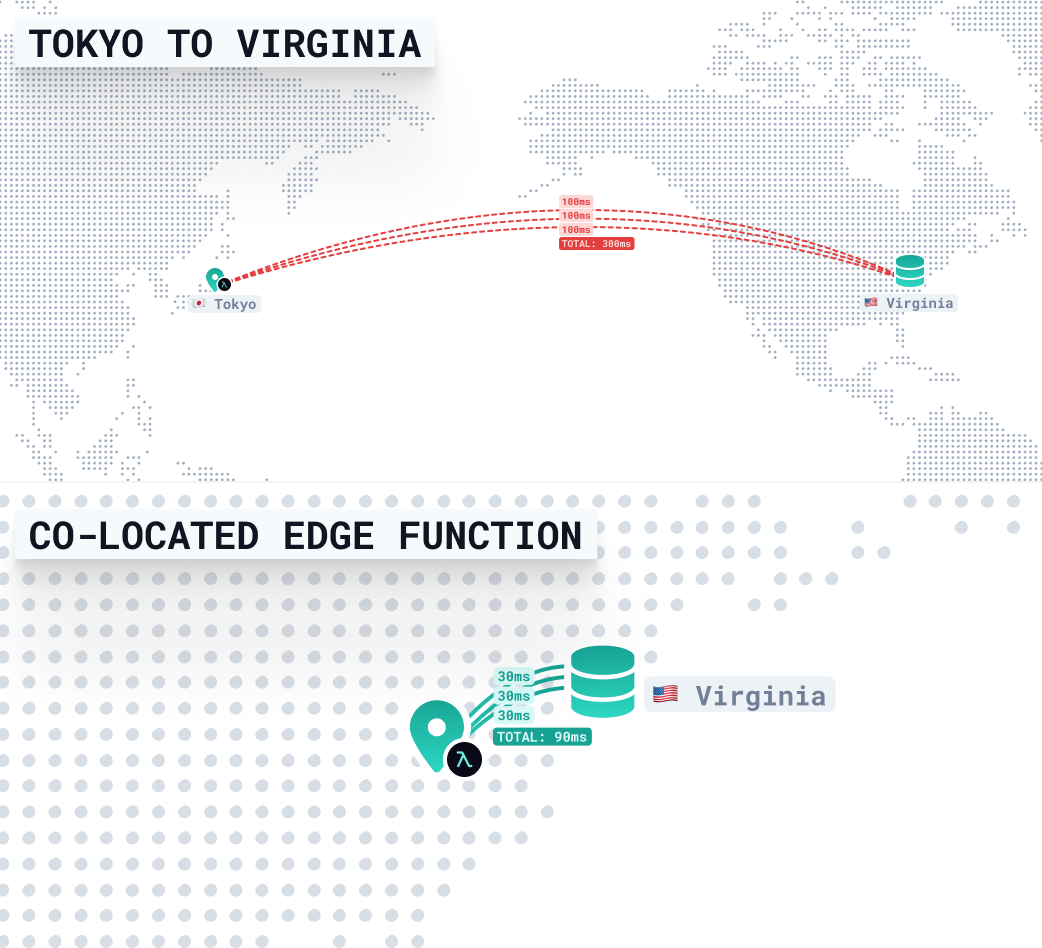
If the function is close to the user (in Tokyo), but far from the database (in Virginia), each database query takes time—about 300ms per round-trip due to trans-Pacific network latency, TLS handshakes, and DNS resolution.
This handler runs three dependent queries, one after the other:
- 3 queries × 300ms = ~900ms total latency
So even before your function does any real work, nearly a second is spent just waiting on data.
Now colocate them
By running the function in the same region as your database (Virginia), those queries no longer need to cross the ocean. They stay local—often completing in 10–30ms each.
That means the entire response can come back in under 90ms, even if the request is coming from Tokyo. The user still waits for some distance-related latency, but your backend stays snappy and consistent.
Region pinning makes this work
Platforms like Vercel, AWS Lambda, and others let you pin your function to a specific region—in this case, us-east-1.
For edge deployments in Vercel, the region config can enable you to pin a region:
export const config = {
  runtime: 'edge',
  region: 'us-east-1',
}

export default async function handler(req: Request) {
  const user = await db.user.findUnique({ where: { id: req.id } })

  if (!user) {
    return new Response(JSON.stringify({ error: "User not found" }), { status: 404 })
  }

  const orders = await db.order.findMany({ where: { userId: user.id } })

  if (!orders || orders.length === 0) {
    return new Response(JSON.stringify({ error: "No orders found" }), { status: 404 })
  }

  const settings = await db.setting.findFirst({ where: { userId: user.id } })

  return Response.json({ user, orders, settings })
}
This setup is ideal when:
- You run multiple queries in sequence
- You want to avoid writing complex client-side caching
- You care about stable, low-latency APIs
Instead of spreading your backend across the globe, colocating your compute with your data avoids hundreds of milliseconds of overhead—with just one line of config.
When to consider a multi-region database
If most of your users are reading data and they’re spread across the globe, a multi-region database can help.
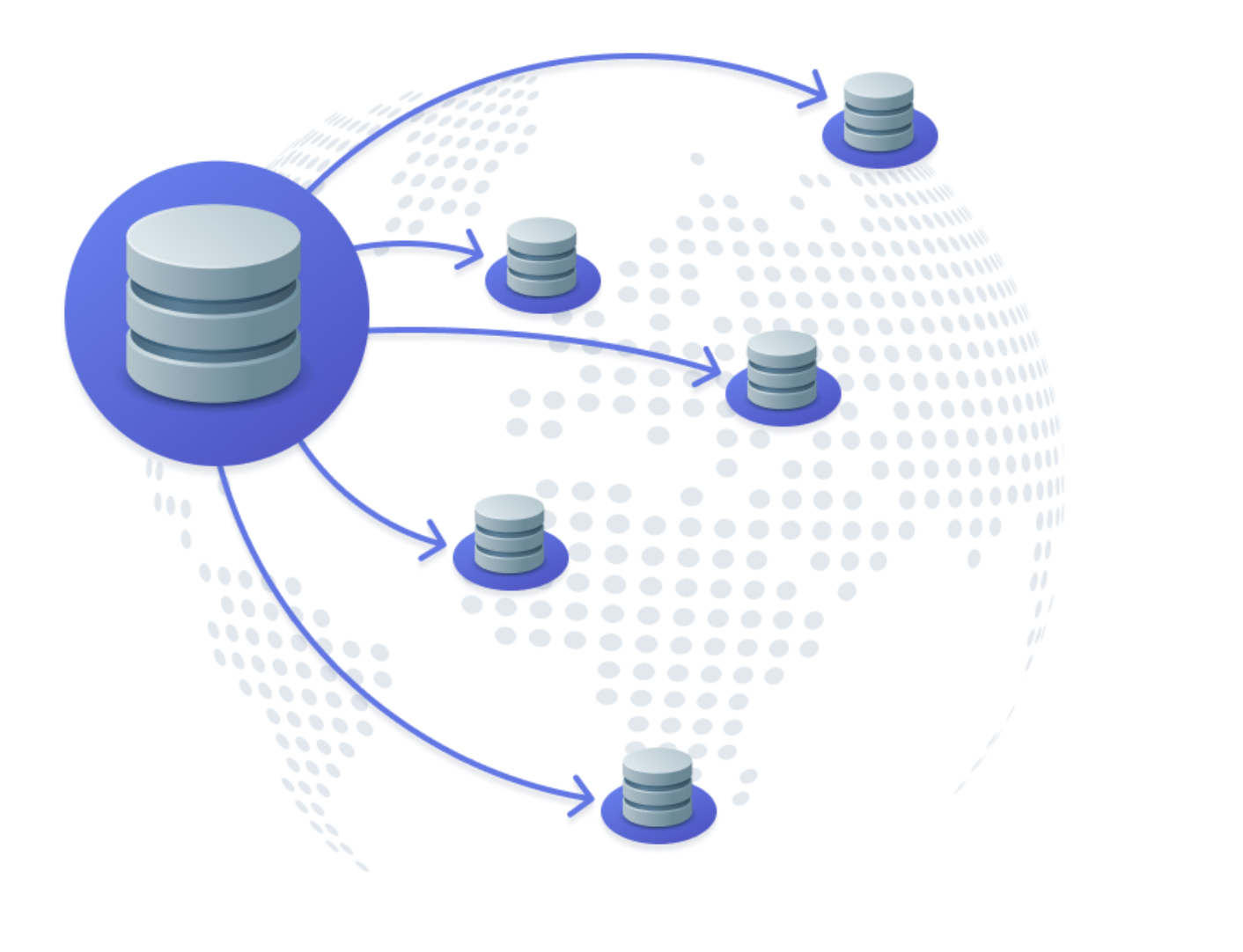
This replicates your data across regions, so users in Europe, Asia, or Australia read from their nearest replica. It improves latency and reduces load on a single database node.
Cloud providers like AWS offer multi-region features like DynamoDB Global Tables and Aurora Global, but purpose-built databases like CockroachDB also make it easy to replicate data across regions for better performance.
Distributed databases a great option when:
- Reads vastly outnumber writes
- Slight staleness (eventual consistency) is acceptable
- You want to reduce global round trips
But hold off if:
- Your app needs strict consistency (e.g. financial transactions)
- You have frequent writes in many regions
- You need precise control over version conflicts
Keep an eye on your queries
Even if you’re caching and colocated, bad queries can still bottleneck your performance.
Set up monitoring early to track percentile latencies:
- p50 = median query time
- p75 = slower queries, usually under light load
- p99 = the worst-case queries, often where performance problems hide
For example, a p50 of 30ms is great—but if your p99 is 700ms, some users are still seeing painful delays.
When identifying performance bottlenecks, also look for:
- N+1 query patterns
- Missing indexes on filtered fields
- Over-fetching nested data
Improving just a few heavy queries can cut your overall latency in half. Tools like Prisma Optimize make this easier by identifying your slowest queries across edge and serverless functions, pinpointing the root causes, and suggesting actionable fixes.

Quick recap
Here’s a quick look at the problems and how to solve them.
| Problem | Fix it by |
|---|---|
| Long database round-trips | Colocate compute with your DB |
| Too many connections | Add a connection pool |
| Repeated reads | Cache at the edge |
| Global latency | Consider multi-region DBs |
| Slow queries | Use monitoring tools like Prisma Optimize or Datadog |
Final thoughts
Shipping to the edge is easy. But making your app feel fast—especially globally—takes a bit more thought.
The good news? You don’t need to rebuild your stack. A few small changes—caching, colocating, pooling, and monitoring—can make a huge difference.
The next time your edge function starts to feel slow, it’s rarely the compute. Nine times out of ten, it’s your database. That’s usually where the slowdown starts, and where the speed gains live.
Let’s keep the conversation going
If this helped you, we’d love to hear about it. Tag us on X and share what you're building. Or hop into our Discord if you want to chat, troubleshoot, or nerd out about databases and performance.
We also post video deep dives regularly on YouTube. Hit subscribe if you’re into that kind of thing. More examples, more performance tricks, and maybe a few surprise launches. We’ll see you there.
About the author
Ankur is a member of the Prisma team who works closely with the developer community, with hundreds of contributions across Prisma's open source repositories and a background that includes founding an ed-tech startup. He writes about TypeScript, Node.js, PostgreSQL, and modern application stacks.
Keep reading
How Prisma helps Amplication evolutionize backend development
How Prisma helps Amplication evolutionize backend development


How Prisma Helps Rapha Manage Their Mobile Application Data
Learn how Rapha uses Prisma to manage mobile application data and deliver consistent APIs across platforms and backend systems.

Build your next app with Prisma
Start free. Scale when you’re ready.