

Neon vs Prisma Postgres when you want hosting and the database in one place
Neon and Prisma can both run your app next to Postgres now: Neon with Functions for the backend, Prisma with Compute for the whole app. This post compares how each connects the app to its data, what a preview gets, how the bills behave, and where Neon is the better pick.

If you want app hosting and Postgres from one vendor, Neon and Prisma can both do it now. Neon made its backend generally available on September 17, 2026. It includes Neon Functions, which run Node.js backend code on each database branch, plus Managed Better Auth and object storage that branch with your data. Prisma runs the whole app, frontend and backend, on Prisma Compute next to Prisma Postgres. So the choice is no longer a database plus a separate host against one stack. It is about how each vendor hands the connection to your code, what a preview environment gets, how the bills behave when the app is idle, and what each one leaves out. This post walks those, and says plainly where Neon is the better answer.
What to compare
Five questions decide this: three about how the app and the database fit together, one about the bill, and one about what each stack leaves out.
- What runs the app? Neon Functions run JavaScript or TypeScript on Node.js 24, for APIs, agents and webhook handlers, and each branch runs its own deployment against that branch's data. They do not host websites, so a web app on Neon still needs Vercel, Netlify or another frontend host. Prisma Compute runs HTTP services, frontends and backends alike, in the same project as the database.
- Where does the connection string come from? Neon injects
DATABASE_URLinto Functions, and its Vercel integrations set it in the Vercel project. With a host that has no integration, you copy it between dashboards. On Prisma it depends on how you deploy. In a Prisma Composer app, which is in Early Access, the database is a declared dependency: the service receives the connection and a typed Prisma ORM client, there is noDATABASE_URLto set, and the deploy applies your committed migrations before the service starts. Without Composer, you create the database and setDATABASE_URLyourself withnpx prisma project env add, once for production and once for preview. - What does a preview environment get? On Neon, a branch is a copy-on-write clone of the database
with its parent's data, and the branch gets its own Functions deployment and storage namespace. On
Prisma, a GitHub Actions workflow running
prisma/cloud-deploy-action, which is marked experimental, deploys a Composer app on every push, and each pushed branch becomes a stage with its own services and databases. A stage's database starts from your migrations, and production data is not copied into it. A connected repository without that workflow deploys nothing on push, and on plain Compute a preview is only as isolated as the previewDATABASE_URLyou set. - What does idle cost? Neon's paid plans have no base fee, and compute up to 16 CU suspends after five minutes of inactivity by default, so an idle project pays for storage, restore history and any extra branches. Prisma charges the plan's base fee, $0 to $129, plus any storage above the plan's allowance. An idle database runs no operations, and an idle Compute app scales to zero and costs nothing.
- What does each stack leave out? Neon does not host websites, and Functions run in four AWS regions for now. Prisma Postgres has no copy-on-write branching and no point-in-time restore, only daily snapshots on paid plans. Prisma Compute runs each service in one region, chosen from six, with no multi-region deployments. It does not support WebSocket servers, it gives each request 60 seconds to start responding before the client gets a 504, and it deploys on push only from GitHub. The integrated preview flow depends on Composer, which is in Early Access.
Connection pooling does not separate the two: both run PgBouncer in transaction mode and give you
pooled and direct connection strings, with no pooler to provision. Prisma Postgres does not include
query caching. The cacheStrategy API belongs to Prisma Accelerate, which is retired on December 1,
2026, including hosted Accelerate connections for Prisma Postgres. Prisma ORM 8, a release candidate,
has an optional cache middleware that keeps results in each process's memory, and it works against
Neon as well.
At a glance
| Prisma Postgres and Prisma Compute | Neon | |
|---|---|---|
| App hosting | Compute runs HTTP services, frontends and backends | Functions run Node.js backends on each branch; no website hosting |
| Connection string | Composer app (Early Access): declared dependency, nothing to set; otherwise you set DATABASE_URL per scope | Injected into Functions; Vercel integrations set it in the Vercel project |
| Preview database | Composer stage: its own database, built from migrations, no production data | Copy-on-write branch with the parent's data |
| Branch pricing | No branching feature; separate databases, no per-branch fee | 10 branches per project on Free and Launch, 25 on Scale, then $1.50 per extra branch-month (no extras on Free) |
| Billing unit | Operations (one per Prisma ORM query, or per SQL statement over a direct connection) plus storage above the plan allowance; Compute usage meters on top | CU-hours plus storage; Functions have their own meters |
| Idle cost | Plan base fee ($0 to $129) plus storage above the allowance; an idle Compute app costs nothing | No base fee on paid plans; storage, restore history and extra branches still bill; compute up to 16 CU suspends after 5 minutes by default |
| Backups and restore | Daily snapshots on Starter, Pro and Business, only on days with activity, kept 7 days (Starter, Pro) or 30 (Business); none on Free; no point-in-time restore | Point-in-time restore: 6 hours (up to 1 GB) on Free, up to 7 days on Launch, up to 30 on Scale; history billed at $0.20/GB-month on paid plans |
| Connection pooling | PgBouncer per database; pooled and direct strings | PgBouncer; pooled and direct strings |
| Database egress | Free on every plan | Free: 5 GB per project; Launch and Scale: 500 GB per project, then $0.10/GB |
| Regions for the app | Six; each Compute service runs in one | Functions in four AWS regions for now |
| Free plan | 200,000 operations, 500 MB, 50 databases, plus a monthly Compute allowance | 100 CU-hours and 0.5 GB per project |
Figures come from both vendors' pricing pages and docs, and from the Prisma Postgres and Neon pricing comparison, which has the full per-plan tables and five worked examples. Check both vendors' current pages before you commit, because these move.
What Neon does well
Branching is the real feature. A Neon branch is a copy-on-write clone of your database, so a pull request can get a branch with production-shaped data, and since the backend release that branch also gets its own Functions deployment, object storage and auth state. Prisma Postgres has no equivalent: a Composer preview gets its own database built from your migrations, and any data in it is data you seed. If your workflow depends on every PR having realistic data, Neon does something we do not, and that is a good reason to choose it.
Restores reach a point in time. Neon's instant restore can take a branch back to any moment inside its history window: 6 hours on Free, up to 7 days on Launch and up to 30 on Scale. Prisma Postgres keeps daily snapshots on paid plans, taken only on days with database activity, so changes made after the last snapshot may not be restorable.
Scale-to-zero suits bursty and business-hours workloads. Compute up to 16 CU autosuspends after five minutes idle by default, so a database that is quiet most of the day costs very little. An always-on production API never suspends, but at high query volume its CU-hours still cost far less than per-query billing.
Usage-based with no floor. Neon's Launch and Scale plans have no fixed monthly base, so a very quiet month can cost a few dollars. Prisma charges the plan fee whether you use it or not.
The frontend host stays your choice. Neon Functions cover the backend, and the frontend can run on
Vercel, Netlify or your own servers. Neon's Vercel integrations set DATABASE_URL in the Vercel
project and can create a database branch for each preview deployment, which makes that pairing a
legitimate architecture with little wiring.
What Prisma Postgres does well
Frontend, backend and database live in one project. Prisma Compute hosts the frontend as well as
the API, so a web app needs no second host. In a Composer app, the service declares the database it
needs and receives the connection and a typed client at runtime, the deploy applies committed
migrations before the service starts, and each pushed branch gets a preview with its own database.
Composer is in Early Access and the deploy action is marked experimental, and both warn that their
interfaces can change between releases. Without Composer, you set DATABASE_URL yourself for each
scope, and preview isolation depends on pointing the preview value at a non-production database.
Billing follows your queries. An operation is one Prisma ORM query, or one SQL statement over a direct connection, so the bill maps to something you can see in your code. That shape fits a user-facing app with quiet hours at moderate query volume. In the comparison's example of that app, Prisma Postgres costs $33.10 a month against about $78 on Neon, which has to stay awake so users never wait on a cold start. The comparison also notes that if the app fits Neon's smallest 0.25 CU compute around the clock, Neon comes to about $21 a month and wins. An idle database runs no operations, so it costs the base fee plus any storage above the plan's allowance.
Spend limits are on by default. Every paid plan includes a hard spend limit that caps what you are charged in a billing cycle, and you can change it in the Console.
Database transfer is free. Prisma Postgres includes unlimited data transfer on every plan, where Neon includes 5 GB per project on Free and 500 GB on paid plans, then $0.10/GB. What the app sends to its users is a separate line: Prisma Compute includes 10 GB of outbound bandwidth on Free and bills $0.025/GB on paid plans, so for a media-heavy app, estimate that line first.
How the bills behave
On Prisma, one plan covers both Prisma Compute and Prisma Postgres. The database bills per operation,
whatever the operation costs to run, plus storage above the plan's allowance. Compute adds four usage
meters: requests ($1 per million after the plan's included requests), provisioned memory ($0.006 per
GB-hour), active CPU ($0.064 per vCPU-hour) and outbound bandwidth ($0.025 per GB). The Free plan
includes a monthly amount of each meter and has no usage billing. Compute does not yet report its
usage the way postgres usage does for the database, so estimate it from the rates.
Neon bills the database in CU-hours, compute size multiplied by hours awake, plus storage, and Neon Functions add their own meters for capacity-hours and invocations. If the frontend runs on another host, that host is a second bill with its own pricing, so price it before you compare totals.
The practical difference is which variable the database bill follows. On Prisma it follows how many queries your code issues, so a chatty page is expensive and an idle app is cheap. On Neon it follows how long the database stays awake, so a quiet app is cheap, and a high-volume API that stays awake all month costs a fraction of the per-query bill. In the comparison's steady-API example, at 50 requests a second with four queries each, that is about $84 a month on Neon against about $1,066 on Prisma Postgres.
Two line items people miss on Neon are extra branches and the instant-restore history. Launch includes 10 branches per project and Scale includes 25, and each branch past that costs $1.50 per branch-month, prorated hourly. Twenty preview branches next to production make 21 branches, 11 over the Launch allowance, which comes to about $16.50 a month before compute, and nothing extra on Scale. The history window bills at $0.20/GB-month on paid plans, separately from your live data.
The full pricing comparison runs five worked examples with the arithmetic shown. Neon is cheaper in three of them: a low-traffic app ($5.25 on Neon against $10.00), the steady always-on API, and a bursty workload ($14.67 against $209.36). An analytics job lands at rough parity, with Neon slightly lower ($46 against $49), and Prisma Postgres is cheaper in one, the user-facing app with quiet hours ($33.10 against about $78).
When to choose which
Choose Neon if a pull request needs a copy of production data, if you need point-in-time restore, if your traffic is bursty or business-hours-only, if you run a high-volume API around the clock, if you want no monthly floor, or if you only need a database for a host you already use.
Choose Prisma Postgres with Compute if you want the frontend, the backend and the database from one vendor, if your app is a TypeScript HTTP service that starts every response within 60 seconds, holds no WebSocket connections and can sleep between requests, if it is a user-facing app with quiet hours at moderate query volume, or if you want a spend limit that is on by default. For the integrated preview flow, you also need to be comfortable adopting Composer while it is in Early Access.
It does not matter much if you are below the free tiers on both and building a prototype. Pick either, and revisit when you have real traffic.
Migrating from Neon
It is standard Postgres on both sides, so there is no proprietary format to convert. Check the version first, though. Prisma Postgres runs PostgreSQL 17, and the official switch from Neon guide uses PostgreSQL 17 tools and stops if the source is newer. Postgres 18 has been the default for new Neon projects since June 2026, so a recently created database may need a separate process that can move data down a version. For a Neon database on 17 or earlier, the guide moves one branch and one database, and it does not copy other branches, project roles or integrations. In outline:
- Pick the Neon branch and database you are moving, confirm it runs PostgreSQL 17 or earlier, and check that its extensions and policies will come across.
- Create the Prisma Postgres destination.
- Stop writes at the source and take the final snapshot. Writes stay stopped from here until step 4 switches traffic.
- Restore, verify row counts against the source, then point the application at the new pooled connection string (migrations and CLI tools use the direct one), test it while traffic is still paused, and switch.
Budget the downtime for steps three and four together. You can rehearse the whole process once while the Neon database is still live, then take a fresh dump for the real cutover. After the final snapshot, do not reopen writes on Neon, because anything written there afterwards is missing from the dump. The part that surprises people is an extension or a policy that did not come across, which is why step one checks for them.
Frequently asked questions
Prisma Postgres has no branching feature. You create separate databases, and there is no per-branch
fee, whereas Neon includes 10 branches per project on Free and Launch and 25 on Scale, then charges
$1.50 per extra branch-month on paid plans. For previews on Prisma Compute, a Prisma Composer app (in
Early Access) that a GitHub Actions workflow deploys with prisma/cloud-deploy-action gives each
pushed branch its own database, built from your committed migrations. Production data is not copied
into it, so it is not a copy-on-write clone of production the way a Neon branch is. Without Composer,
you create a preview database yourself and point the preview DATABASE_URL at it.
Neon hosts the backend: Neon Functions, generally available since September 17, 2026, run JavaScript
or TypeScript on Node.js 24 next to your data, with DATABASE_URL injected, and each database branch
runs its own deployment of them. Functions do not host websites, so a web app on Neon still needs a
frontend host such as Vercel or Netlify. Prisma Compute hosts frontends and backends in the same
project as Prisma Postgres.
It depends on whether your bill should follow queries or uptime, because the two bill on different units. Prisma Postgres charges per operation, so an idle app costs the plan fee plus any storage above the plan's allowance. Neon charges CU-hours with no base fee on paid plans, so a quiet or bursty app costs little, and a high-volume API that runs all day costs far less than it would per query: about $84 a month on Neon against about $1,066 on Prisma Postgres in the steady-API example of the Prisma Postgres and Neon pricing comparison. That comparison works through five examples with the arithmetic shown. Neon is cheaper in three, an analytics job is at rough parity ($46 on Neon against $49), and Prisma Postgres is cheaper in one, a user-facing app with quiet hours at moderate query volume ($33.10 against about $78).
Prisma ORM works with any PostgreSQL database, including Neon, and it is free. Using Prisma ORM does not require Prisma Postgres, and choosing Neon for the database does not stop you using the ORM. Prisma ORM 8 is a release candidate, with general availability expected in October 2026, and Prisma ORM 7 keeps getting fixes for 18 months after that.
Both are standard PostgreSQL, so a Neon database on PostgreSQL 17 or earlier moves with an ordinary dump and restore, with no proprietary format involved. Prisma Postgres runs PostgreSQL 17, and Postgres 18 has been the default for new Neon projects since June 2026, so check the version first: PostgreSQL 17 tools cannot dump a newer server. The official switch-from-Neon guide covers the move in nine steps. The maintenance window runs from stopping writes at the source for the final snapshot, through the restore, the row-count check and the application test, until traffic switches to Prisma Postgres. The usual complication is an extension or policy that needs recreating.
The short answer
If the reason you are asking is that you want fewer moving parts, both vendors can now hold the app and the database in one project. On Neon, the backend runs on Functions and every branch gets a copy-on-write copy of your data with its own deployment, though the frontend still needs a host. On Prisma, Compute runs the frontend and the backend, and in a Composer app the database is declared, the deploy migrates it, and each preview branch gets a fresh one with no production data. So the deciding question is still whether a pull request in your team needs a database with real data in it. If yes, choose Neon. Choose Neon as well for point-in-time restore, bursty traffic, or a high-volume API that runs all day. If none of that applies and your app fits the Compute limitations, one project holding the frontend, the backend and the database is the case Prisma Compute and Prisma Postgres are built for.
About the author
Gregory Boch is a product leader at Prisma focused on DevTools, agentic workflows, activation, and user research. With a background in engineering, startup founding, and computer science research, he writes from hands-on experience building developer products and turning technical decisions into better user experiences.
Keep reading
How One Founder Builds a Live Sports Platform Without a Database Team
How Xeito uses Prisma ORM and Prisma Postgres to ship live scoring, leagues, payments, and player workflows without a database team.
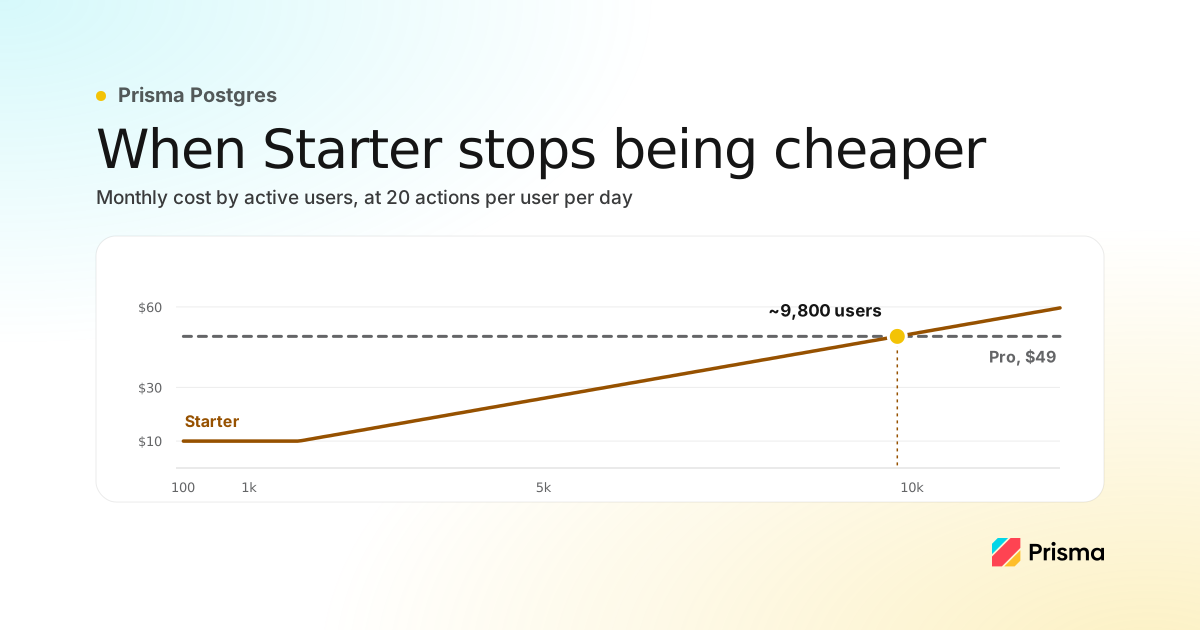
Choosing hosting and Postgres after your first 100 paying users
A scaling checklist, where to run your app, what Postgres costs at 100, 1,000 and 10,000 users with the arithmetic shown, and signs you have outgrown it.
Build your next app with Prisma
Start free. Scale when you’re ready.