

Prisma vs Vercel: where should you build your next TypeScript app?
Prisma catches a service wired to the wrong API or the wrong database before it deploys. Vercel gives Next.js its platform features, runs Node.js and WebSockets, and previews with production data. Here is how to choose.

If your app is a few TypeScript services that share a Postgres database, Prisma is the better fit. You declare the services, their databases, and the calls between them in one TypeScript file. The compiler rejects a service that points at the wrong API or the wrong database schema, and one deploy command creates everything the file describes.
Vercel builds and serves your framework code from a push. The connections between services, and the database each one uses, are yours to set up and keep correct.
Vercel is the better fit when you rely on the Next.js features it provides at the platform level, or when your app runs on Node.js or has a backend in another language. It is also the better fit if you need WebSockets or requests that run for minutes, or if you want every preview to start with a copy of production data.
Prisma's hosting runs on Bun in one region, gives each request 60 seconds to start responding, and gives every preview an empty database.
"Prisma" here means more than the ORM:
- Prisma ORM 8 is the typed data layer. It is a release candidate, with general availability expected in October 2026, and it runs on any host, including Vercel.
- Prisma Postgres is the managed database.
- Prisma Compute hosts TypeScript services.
- Prisma Composer, in early access, declares how services and databases connect and deploys them to Compute and Prisma Postgres.
This post compares the three hosting products with Vercel. The last section covers running Prisma ORM and Prisma Postgres on Vercel.
The decision in brief
Choose Prisma if:
- Several TypeScript services call each other, and you want a mismatched API contract or a missing handler to fail the type check instead of a deploy or a production request.
- You want every Git branch to be a full environment with its own services and variables. You are willing to create its database with one command or a Composer deploy.
- Your services run on Bun, or can, and one region is enough.
- You do not want to pay per seat. Vercel charges $20 a month per additional team member; Prisma charges a plan fee plus usage.
- You accept pre-release tooling. Prisma ORM 8 is a release candidate and Composer is in early access.
Choose Vercel if:
- You use Next.js features that Vercel provides at the platform level, such as its caching layer and on-demand image optimization. Compute runs Next.js, but you build an image route yourself.
- Your code runs on Node.js, or your backend is not TypeScript. Vercel Services runs a Next.js frontend beside a Python backend in one project.
- You need WebSocket servers. Vercel Functions serve them in public beta; Compute does not support them.
- A request needs more than 60 seconds before it starts responding. Vercel Functions allow 300 seconds by default and 800 on Pro.
- You want preview databases that start as a copy of production. Vercel's Neon integration creates one for every preview.
| Prisma | Vercel | |
|---|---|---|
| Hosting | TypeScript services on Prisma Compute, on Bun, one region each | Framework deployments and Vercel Functions; Services groups several apps |
| Managed Postgres | Prisma Postgres, usable from any client | Marketplace providers, including Prisma Postgres and Neon |
| Typed data access | Prisma ORM 8 or any client | Any ORM or client, including Prisma ORM |
| Service-to-service calls | Composer binds each dependency to a typed contract and checks it at compile time | Service bindings (beta) inject a URL; types are yours to add |
| Previews | One environment per Git branch, deleted with the branch | One preview URL per Git branch |
| Preview databases | One per branch, created by you or by a Composer stage deploy, no production data | Provider-specific; Neon copies production per branch |
| Long-running work | 60 seconds to first byte, then waitUntil; no WebSockets | 300 to 800 seconds, 30 minutes in beta; WebSockets in beta |
| Billing | Plan fee plus requests, memory, CPU, and bandwidth | Plan fee plus compute, delivery, builds, and seats |
Sources for the table: the Compute limitations page and Vercel's Services, function duration, WebSocket changelog, and Fluid compute pricing pages.
What each platform sets up for you
Both platforms deploy from a Git push. They differ in how much of your app's structure they know about.
On Vercel, you connect a repository, Vercel detects Next.js or another framework, and each push builds it into static assets and Vercel Functions served through the delivery network. Vercel Services extends that to several apps in one project, including a Next.js frontend with a Python backend, with routing declared in vercel.json.
A service binding, in beta at the time of writing, makes one service reachable from another by injecting its URL as an environment variable. What crosses that call is a URL. If you want the compiler to check the request and response shapes, you add shared types or a generated client yourself.
On Prisma, Composer works at the level of services:
- Declare each service in TypeScript, together with what it depends on: other services, a Prisma Postgres database, a cron schedule, or object storage.
- Give each service a contract, meaning typed request and response schemas written with arktype, zod, or any Standard Schema validator.
- Declare the contracts a service calls as its dependencies. At runtime the service receives a typed client for each one.
- Wire everything in a root module. TypeScript checks the wiring, so binding a dependency to a service with a different contract, or leaving out a handler the contract requires, is a compile error.
- Run
prisma deploy. It creates the services on Prisma Compute, the databases on Prisma Postgres, and the authenticated connections between them. Application code never builds a URL fromprocess.env.
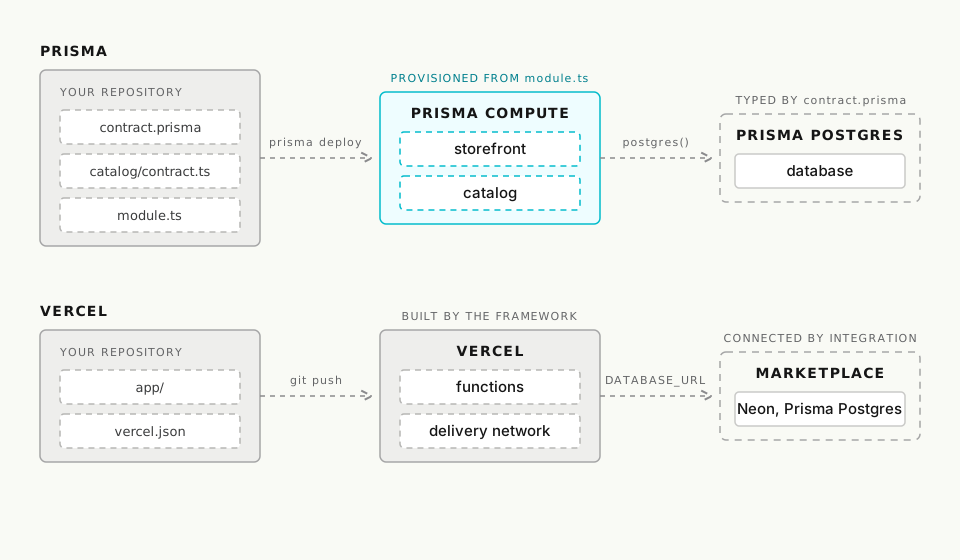
The two files below declare a storefront that asks a catalog service for a price. The storefront names the catalog's contract in deps, and the root module decides which running service satisfies it.
import nextjs from "@prisma/composer/nextjs";
import { rpc } from "@prisma/composer/service-rpc";
import { compute } from "@prisma/composer-prisma-cloud";
import { catalogContract } from "../catalog/contract.ts";

export default compute({
  name: "storefront",
  deps: { catalog: rpc(catalogContract) },
  build: nextjs({ module: import.meta.url, appDir: ".." }),
});
Suppose the catalog team changes getPrice to return an amount and a currency instead of a single number. Every caller that still expects a number fails to compile. A shared-types package in a monorepo gives you that much.
The root module adds a second check. If it binds storefront to a service that serves a different contract, that is a compile error too, not a 404 after the deploy. The store example in the Composer repository is the complete version of this app.
Databases are declared the same way. A service lists a postgres() dependency typed by your data contract, the contract.prisma schema file that replaced schema.prisma in ORM 8. The module that owns the database provisions it. The deploy applies the database's migrations before the service starts, and it refuses to connect a service to a database whose schema does not match the contract the service was compiled against.
You do not need any of this to start. A single service deploys to Prisma Compute from a Git push without Composer, and you can add Composer when a second service or a scheduled job appears.
Previews and their databases
Both platforms give every branch a running preview. They differ in what sits behind it, and that decides how much setup you do before a preview is useful.
On Prisma, a Git branch maps to a platform branch with its own services, environment variables, and any databases created on it. Deleting the Git branch deletes all of that. The database is not created for you unless you use Composer. For a single service:
- Create a database on the branch:
npx prisma@latest postgres create preview-db. - Point the branch at it:
npx prisma@latest project env add DATABASE_URL=<printed-url> --branch feature/search. - Seed it if the feature needs realistic rows, because it starts empty.
A Composer stage deploy, npx prisma@latest deploy module.ts --stage <branch>, replaces the first two steps. It creates the databases the module declares and runs their migrations, but the databases still start empty.
A preview uses whatever DATABASE_URL it was given, so a preview that inherits the production value writes to production. Keep production and preview values in separate scopes, as the environment variables docs describe.
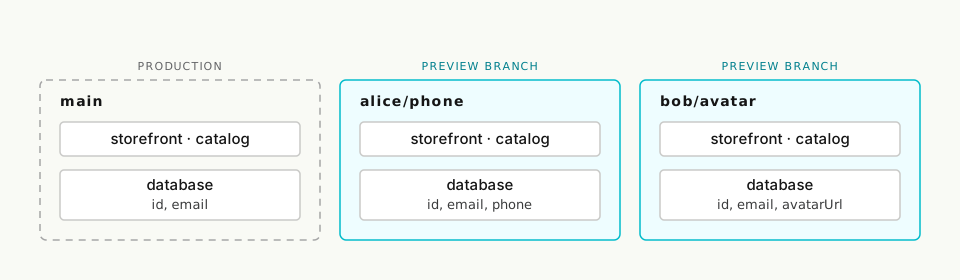
On Vercel, a push to a feature branch builds a preview URL, and a merge deploys production. The preview's database comes from whichever Marketplace integration you connected. With the Neon integration, each preview gets a copy-on-write database branch that already holds the parent's data and schema, as Vercel's Ephemeral Environments guide describes.
For testing against production-shaped data, this is the more convenient setup, because there is nothing to seed and nothing to point.
The Prisma Postgres listing sets a single DATABASE_URL for the project, and you scope previews away from it with Vercel's per-environment variables.
Schema changes travel the same way on both platforms: as migration files in Git that a deploy applies. Prisma ORM 8 helps when two branches change the schema at the same time:
- Alice adds
phoneon her branch and Bob addsavatarUrlon his. Each tests against their own database. - Both branches merge. Alice's database has one column, Bob's has the other, and staging and production have neither.
- In Prisma ORM 6 and 7, migrations ran in timestamp order, so every database had to be walked through the same list. ORM 8 records, for each migration, which schema version it starts from and which it produces, so the migrations form a graph.
- Whoever merged runs
migration planonce per branch, which writes the two merge migrations. - From then on,
db migratebrings any database from its current version to the merged one.
Two migrations that change the same column still need a person to resolve them.
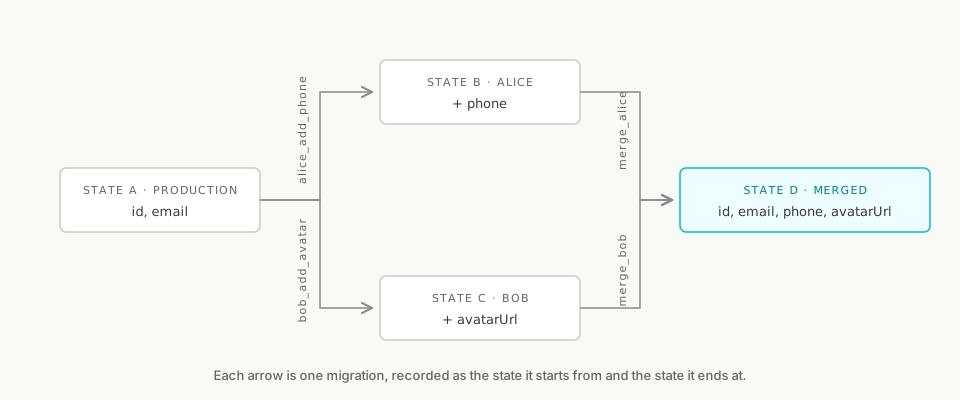
The graph belongs to Prisma ORM 8, not to Prisma's hosting, so you get it on Vercel by running ORM 8 there. The hosting adds a database per branch to test against and, with Composer, a deploy that runs the migrations for you.
Runtime limits
Prisma Compute runs TypeScript HTTP services on Bun. Builds detect Next.js, Nuxt, Astro, Hono, NestJS, TanStack Start, and plain Bun servers, and an existing Node.js app has to run under Bun to move. The limitations page lists the constraints:
- Each service runs in one region, and there is no edge runtime.
- WebSocket servers are not supported.
- A request has 60 seconds to start responding before Compute cancels it.
- Work that continues after the response, such as processing a webhook after returning
202, useswaitUntil. That keeps the instance alive but does not retry a failure or survive a redeploy.
Compute does not require Prisma ORM, so an app on ORM 6 runs unchanged. The migration behavior above assumes ORM 8.
Vercel Functions run on Node.js as well as Bun, and the Next.js integration supplies caching and on-demand image optimization without application code.
Vercel Functions run for 300 seconds by default and up to 800 seconds on Pro, with a 30-minute extended duration in beta, and they serve WebSocket connections in public beta. If your app holds long connections or runs multi-minute requests, Vercel supports that directly. On Compute, that work has to move into short requests or a Composer cron schedule.
What you pay for
Both platforms scale to zero, and both bill memory only while an instance is running and CPU only while code runs. An app that mostly waits on a database therefore pays for memory but little CPU.
Prisma Compute charges a plan fee plus four usage meters and nothing for deployments, previews, or seats. Vercel charges a plan fee with a usage credit, then compute, delivery, and builds, plus $20 a month for each additional team member. Vercel's rates below are Pro prices in its cheapest US regions, and the Fluid compute pricing page lists the rest.
| Meter | Prisma Compute | Vercel Pro (cheapest US regions) |
|---|---|---|
| Plan | Free, or $10, $49, or $129 a month with 5, 20, or 100 million requests included | $20 a month, including a $20 usage credit |
| Requests | $1 per million after the included amount | $0.60 per million |
| Memory | $0.006 per GB-hour | $0.0106 per GB-hour |
| Active CPU | $0.064 per vCPU-hour | $0.128 per CPU-hour |
| Bandwidth | $0.025 per GB | Regional; Pro includes 1 TB a month |
| Builds and previews | Not billed | $0.007 per build minute on paid teams |
| Seats | Not billed | $20 a month per extra seat |
Prisma Postgres has its own pricing, as does any Marketplace database on Vercel. One exception to scale-to-zero on Prisma: Composer's cron scheduler keeps one instance awake per deployed app or stage so that it can fire on time. The Prisma Compute vs Vercel pricing post prices a full month meter by meter.
Using Prisma ORM and Prisma Postgres on Vercel
Prisma ORM does not require Prisma's hosting. It runs in any Vercel app, and Prisma Postgres is in the Vercel Marketplace, where the integration provisions a database and sets DATABASE_URL in your project. The Vercel guide covers Next.js, Nuxt, and SvelteKit.
To run migrations, add npx prisma@latest db migrate --db "$DATABASE_URL" to your build or release step. That gives you ORM 8's migration graph on Vercel without moving the app.
Frequently asked questions
Which one to pick
Pick Prisma if your backend is several TypeScript services that share Postgres and you can live with Bun, one region, and pre-release tooling. The compiler then checks the wiring between those services, and the deploy creates it. Start with the Composer getting-started guide, which runs two services locally without an account.
Stay on Vercel if your app leans on Vercel's Next.js features, needs Node.js, WebSockets, or long requests, or if you want previews that arrive with production data. The Vercel guide brings Prisma ORM 8 and Prisma Postgres there.
About the author
Shane is a product leader at Prisma with more than 15 years in technology, including five years prototyping new products at Google and founding a venture-backed startup of his own. He writes about product strategy, go-to-market, and building tools developers genuinely want to use.
Keep reading
Prisma vs Netlify: where should you build your next TypeScript app?
Prisma vs Netlify compared for TypeScript apps: what each platform provisions and checks for you, preview databases, migrations, runtime limits, and pricing.
How One Founder Builds a Live Sports Platform Without a Database Team
How Xeito uses Prisma ORM and Prisma Postgres to ship live scoring, leagues, payments, and player workflows without a database team.

Build your next app with Prisma
Start free. Scale when you’re ready.