

How I Built a Chat App That Never Drops a Token
How I built Open Chat: durable, resumable AI chat where the answer is safe the instant it exists. It runs on Durable Streams, Prisma Streams, TanStack DB, and Prisma Compute.

One small thing has annoyed me in every AI chat app I've used: you ask a long question, the answer starts streaming, and then you close the tab, or your wifi blips, or the phone locks, and the tail is gone. Reopen the chat and the message is truncated or missing. The tokens were on screen and nowhere else, so when the screen went away, so did they.
I wanted the opposite: a chat app where the answer is safe the instant it exists, and the screen is only a view of it. So I built one. It's called Open Chat, it's live at oss.chat, and it's open source at prisma/open-chat.
Four pieces of technology make "never drop a token" the easy path instead of the hard one:
- Durable Streams: an append-only log that survives the machine.
- Prisma Streams: one stream per user, one routing key per chat.
- TanStack DB: the UI is a live query over that log.
- Prisma Compute: the app and its log deploy side by side, next to the database.
There's an animated guided tour at oss.chat/tour if you'd rather scroll through it, and this post is the longer, more personal version.
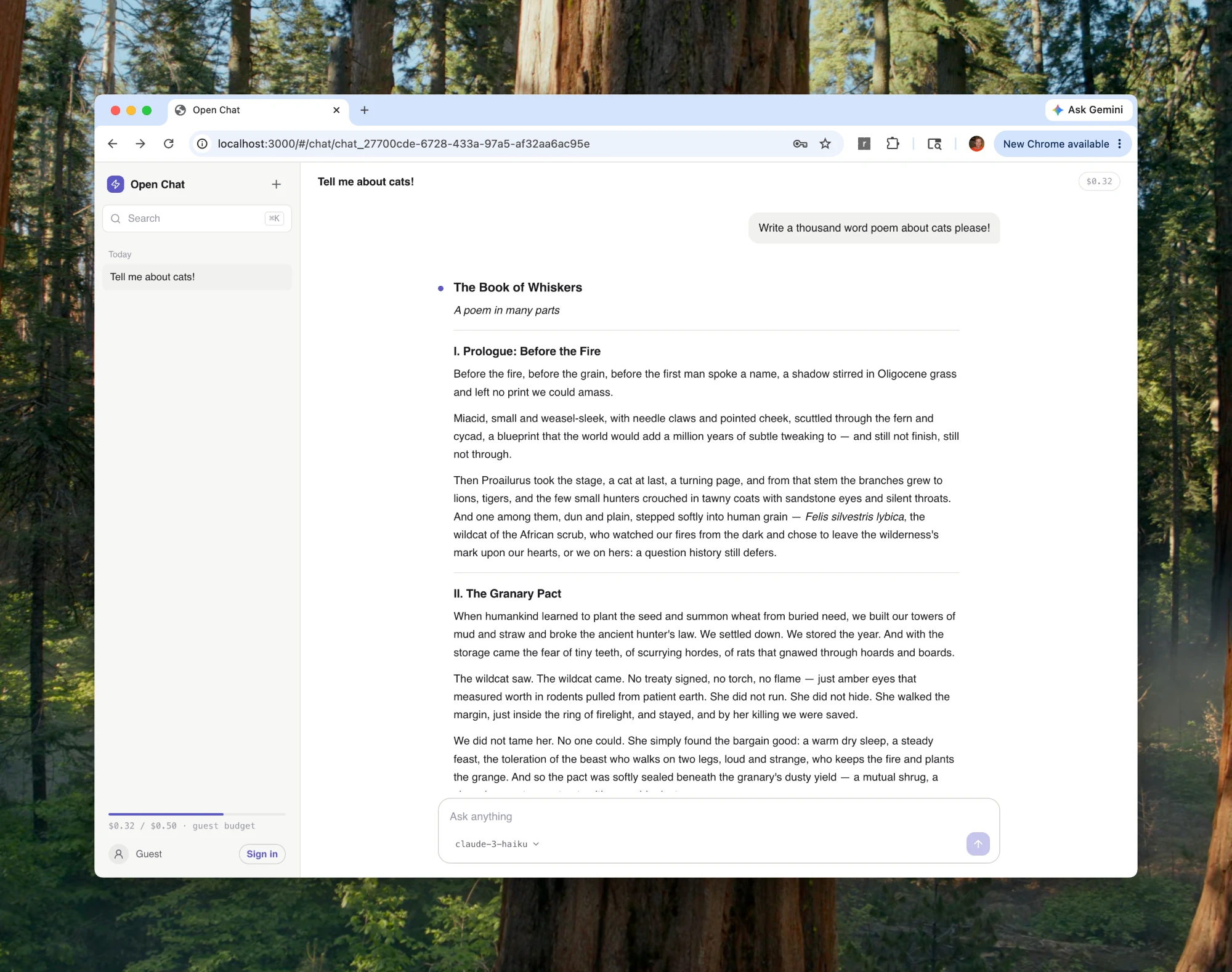
The one rule: nothing on screen that isn't already durable
Most chat apps stream tokens to the browser and save the finished message afterwards, and that ordering is the bug: if the message only becomes real after the stream ends, anything that interrupts the stream loses data.
Open Chat inverts it. Every event is appended to a durable log first, and everything you see is a replay of that log. The chat history isn't a row that gets written at the end. It is the sequence of events, stored as they happen:
{ "type": "message.created",   "role": "user",      "text": "Tell me about cows!" }
{ "type": "message.created",   "role": "assistant", "text": "" }
{ "type": "message.delta",     "role": "assistant", "text": "Cows are" }
{ "type": "message.delta",     "role": "assistant", "text": " fascinating" }
// …one event per token batch…
{ "type": "message.completed", "usage": { "outputTokens": 312, "costMicroUsd": 9 } }
A single pure function folds that log into the messages you see on screen. The same function runs on the server (to replay history) and in the browser (to follow the live feed), so the two can never disagree about what a conversation contains (src/shared/messages.ts).
Once you commit to that rule, a dropped connection stops being a data-loss bug and becomes a non-event: the client reconnects and replays from its last offset to catch up. A refresh, a flaky network, even the server restarting underneath you, none of it changes what's in the log.
What makes that rule cheap to follow is the four technologies underneath it.
The system in one picture
Six moving parts, one invariant: nothing reaches your screen that isn't already durable. Watch the tokens: the model's deltas (amber) only travel on to the browser after they're appended to the log (green).
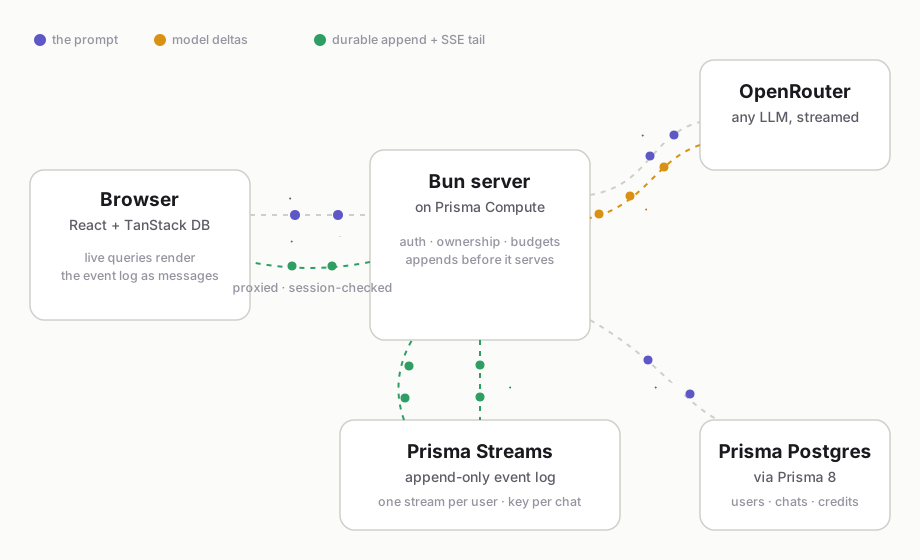
- You send a prompt. The browser POSTs it to a Bun server, which checks your session, that you own the chat, and that you have credit.
- The server asks the model. One streaming call to OpenRouter, to any model in the catalog: text, vision, or image generation, switchable mid-conversation.
- Tokens stream back as small deltas, a few words at a time.
- Every delta is appended first. Before the browser sees a token, it's written to your durable stream. The log is the chat, not a cache of it.
- The browser tails the log over Server-Sent Events: replay from any offset, then follow live. It never touches the stream directly; the Bun server proxies the tail and checks your session first.
- Metadata stays relational. Chat titles, accounts, and credits live in Prisma Postgres. In the browser, TanStack DB joins both worlds, relational data and the live event stream, into one set of live queries.
Durable Streams: a log that survives the machine
The foundation is Durable Streams, an append-only log with a simple durability contract: an append isn't acknowledged until it's recoverable, and a reader can resume from any offset, forever.
What sold me is how it stays durable without being slow. Writes land in a local SQLite write-ahead log, the hot tier: fast and on-box. In the background, the log is sealed into segments and uploaded to object storage (I use Cloudflare R2). Object storage is the durable tier, the thing that outlives any single machine. When a fresh instance boots, it rehydrates from the bucket and keeps going.
That inversion is the point. The local disk is disposable; the bucket is the source of truth. So when the platform replaces my instance (a deploy, a crash, a scale-to-zero wake-up), chat history doesn't even notice.
The runtime behind all of this is @prisma/streams-server. Running it as a real service is almost entirely configuration. The deployable entrypoint is about 30 lines, and most of those are comments explaining the trade-offs:
// @prisma/streams-server is the full runtime: SQLite WAL, segmenting,
// R2 upload, recovery, bearer-key auth. This entry just sets defaults.
import { existsSync } from "node:fs";

process.env.DS_HOST ??= "0.0.0.0";
// Keep the hot tier on /tmp; R2 is the durable tier, so losing /tmp is fine.
process.env.DS_ROOT ??= "/tmp/ds-data";
// Seal a segment at least every 5s, so an abrupt instance death can lose
// almost nothing rather than waiting to hit a size threshold.
process.env.DS_SEGMENT_MAX_INTERVAL_MS ??= "5000";

process.argv.push("--auth-strategy", "api-key");
// On a fresh instance (no local WAL yet), rehydrate history from R2.
if (!existsSync(`${process.env.DS_ROOT}/wal.sqlite`)) {
  process.argv.push("--bootstrap-from-r2");
}

await import("@prisma/streams-server/compute");
What it enables: durability that I never have to think about at the application layer. I don't checkpoint, I don't reconcile, I don't write a "did the stream finish?" recovery job. I append, and the append is safe.
Prisma Streams: one stream per user, one key per chat
Durable Streams gives you a durable log. Prisma Streams is the runtime and HTTP API on top of it that makes the log usable as an application primitive, with the data model that turned out to fit chat perfectly.
The model is: each user owns a single append-only stream, and each chat is a routing key inside it. A user can have hundreds of chats without spawning hundreds of streams, and the events from different chats simply interleave in one log, tagged by key.
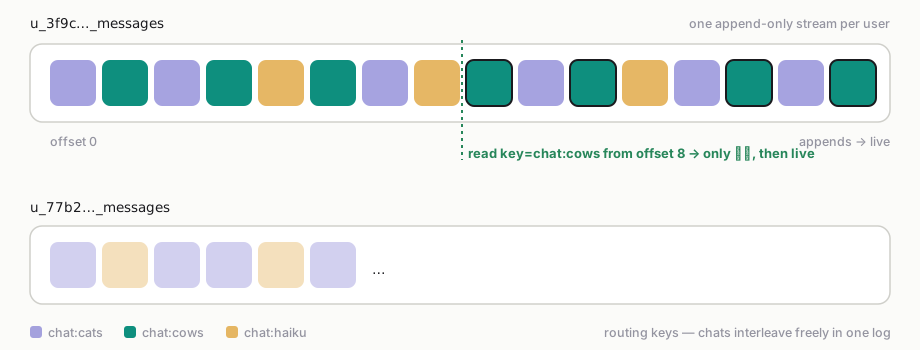
A key-filtered read picks one chat out of the interleaved log and resumes from any offset. It stays fast as the log grows because Streams keeps a tiered routing-key index on the side, without ever touching the single-log write path (how the tiered index works). The API is just HTTP:
# append: durable before the UI ever sees it
POST /v1/stream/u_3f9c…_messages
stream-key: chat:chat_38eb…

# read: replay + live tail from any offset
GET  /v1/stream/u_3f9c…_messages?offset=412&live=true&key=chat:chat_38eb…
Two details matter for a real app. First, the browser never talks to Streams directly. It calls my Bun server, which validates the Better Auth session, confirms the user owns the chat, and only then proxies the append or the tail. The durable log is private infrastructure; the public surface is an authenticated endpoint. Second, reads can long-poll, which makes the SSE tail cheap: the connection parks waiting for the next event instead of busy-looping.
What it enables: resumable streaming and clean tenant isolation fall out of the data model itself. The client wrapper is about 140 lines (src/server/streams.ts). Reconnecting is "read from my last offset," the same operation as reading history, because in this design they are the same operation.
TanStack DB: the UI is a live query over the log
For a while the browser side was where this kind of architecture usually falls apart. You have relational data (the chat list, your credit balance) and a firehose of stream events (hundreds of deltas a second), and you have to merge them into UI without re-rendering the world on every token.
TanStack DB made that the simple part, so there's no bespoke state manager in Open Chat at all. Server data lives in query collections backed by the API. Stream events fold into a local messages collection, using that same materializer from the first section. Components just render live queries:
// each incoming stream event folds into the collection…
applyMessageEvent(messages, event);

// …and components simply query it
const { data: messages } = useLiveQuery(messagesCollection);
The payoff is in the re-renders. When an event arrives, exactly the affected rows update: streaming a long answer re-renders one message, not the page. And because both relational collections and the stream-fed collection are queryable the same way, a component can join "the chats I own" with "the live status of the one I'm viewing" in a single declarative query. The live event stream and the typed Postgres data meet in the same place.
That typed Postgres data comes from Prisma 8: one contract file describes users, chats, and credits, and compiles to a fully typed client. db.orm.Chat.where({ userId }).orderBy(c => c.updatedAt.desc()).all() autocompletes every column. The relational half of the app gets the same "no surprises" feeling the streaming half does.
What it enables: one query language for two kinds of data. The chat list, the credit balance, and the live token stream all read the same way, so there's no glue layer and no second state manager to keep in sync.
Prisma Compute: two apps, one project, one command each
The part that surprised me: production is this exact repo, deployed twice (the chat server and the Durable Streams service) side by side in one Prisma Compute project, next to the Prisma Postgres database they share.
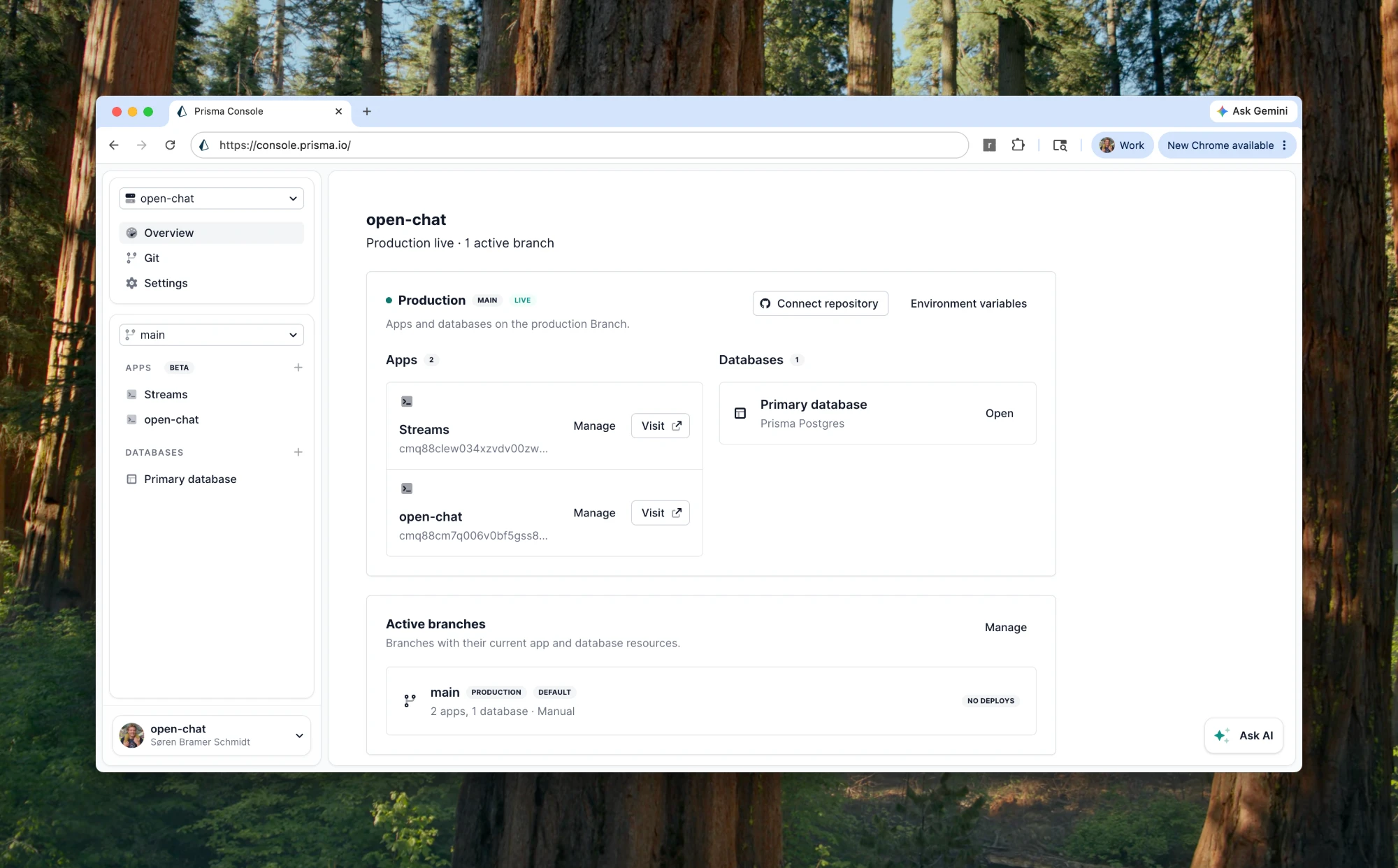
Each app is one command. The CLI builds locally, uploads, and returns a live URL when the deploy finishes. Secrets live in Compute's env config, never in the repo:
$ bunx @prisma/cli app deploy --app Streams \
    --entry src/streams-app/index.ts --prod
$ bunx @prisma/cli app deploy --app open-chat \
    --entry src/start.ts --prod

Live in 13.7s  →  https://oss.chat
What makes this click is co-location. The Streams service runs on the same infrastructure as the app and the database, in the same project, on the same branch. The app and its durable log aren't two vendors I'm gluing together across the public internet. They're two processes a few milliseconds apart, deployed from one checkout, visible in one console.
What it enables: the operational story is boring, which is exactly what you want. There's no separate streaming vendor to provision, no cross-cloud networking, no fourth dashboard. I push, both apps redeploy, and the bill is just the work they do. The same loop my coding agent uses to build the app (change, deploy, read the logs, fix, redeploy) is the loop that ships the streaming infrastructure too.
What the log made simple
The thing I didn't expect: once the log is the source of truth, features that are normally fiddly get short.
- Billing you can audit. Credits are a ledger in Postgres, but every Stripe webhook also gets appended to its own dedicated stream. Processed, rejected, or replayed, the evidence survives. When I want to answer "did Stripe call us, and what did we do about it?", the answer is a stream read.
- Images in the log. Generated images ride the same event stream as text: thumbnails inline in the log, originals in object storage, served per user. No special path.
- Live public stats. A public /stats page draws anonymous aggregates straight from Postgres (accounts, chats, and tokens streamed) with dependency-free SVG charts.
Each of these reuses a pattern that already existed instead of inventing a new one. That's the real dividend of picking "the log is the source of truth" on day one.
Try it, then read it
Everything above is live. Go open a chat at oss.chat. You get a guest budget immediately, no sign-up. Then try the thing that started all of this: ask for a long answer, close the tab mid-stream, and reopen it. The reply finishes where it left off.
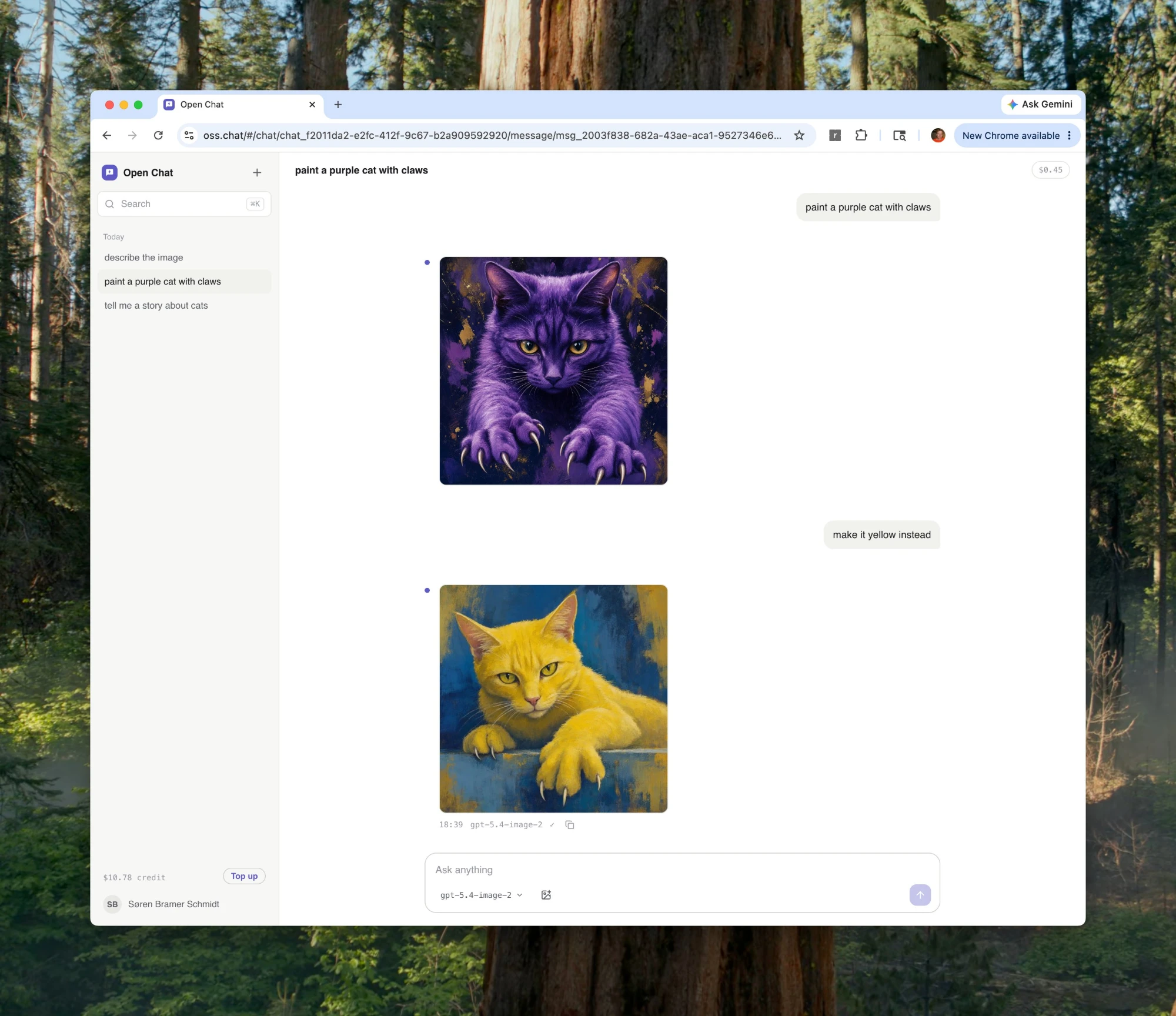
Then read the code. The whole app is about 6,000 lines and built to be read. The guided tour walks the stack one piece at a time, and the repository is MIT licensed. To run your own, the README has the full deploy-to-Compute walkthrough; it really is two commands once your project exists.
I set out to fix one tiny annoyance: a chat that drops its tail when you look away. What I ended up with is a small demonstration that durable, resumable streaming doesn't have to be exotic infrastructure. It can be an append-only log, a typed database, a live query, and one deploy command. Never dropping a token turned out to be the easy path, as long as you let the log be the truth.
The reason it stayed simple is that the app, the streaming service, and the database all live in one place. That's what Prisma Compute and Prisma Postgres are for: your app runs next to your data, deploys in one command, and is free to try on the Free plan. If you want the rest of the story, see how we launched Compute, why it runs on Bun's Rust rewrite, and how it handles image transformations and custom domains. Come build with us in #prisma-compute on Discord.
About the author
Søren is a co-founder of Prisma and previously co-founded Graphcool, the GraphQL backend platform that grew into Prisma. Before founding companies he worked as a software architect at Trustpilot, and he has spent well over a decade building tools that simplify how developers work with data. He writes about databases, developer tooling, and the direction of modern application infrastructure.
Keep reading

App Hosting and Compute Platforms for AI Agents in 2026
A field guide to the 2026 wave of app-hosting and compute platforms (Prisma Compute, Neon, Cloudflare Containers, Hosting.com, Unkey, and Insforge) and how close each gets to one coherent stack for agents.

Infraslopture and Other Paradoxes
How we're combining untrustable agents and production infrastructure without burning down our servers

Build your next app with Prisma
Start free. Scale when you’re ready.