

Connections, Edges & Nodes in Relay


The terminology of Relay can be quite overwhelming in the beginning. Relay introduces a handful of new concepts on top of GraphQL, mainly in order to manage relationships between models..
This already leads to the first new term: a one-to-many relationship between two models is called a connection.
Example
Let’s consider this following simple GraphQL query. It fetches the releaseDate of the movie “Inception” and the names of all of its actors. The actors field is a connection between a movie and multiple actors.
{
  movie(title: "Inception") {
    releaseDate
    actors {
      name
    }
  }
}
Now let’s take this query and adjust it to the expected format of Relay.
{
  movie(title: "Inception") {
    releaseDate
    actors(first: 10) {
      edges {
        node {
          name
        }
      }
    }
  }
Edges and nodes
Okay, let’s see what’s going on here. The actors connection now has a more complex structure containing the fields edges and node. These terms should be a bit more clear when looking at the following image.
Don’t worry. In order to use Relay, you don’t have to understand the reasons why the structure is designed this way but rest assured that it makes a lot of sense.
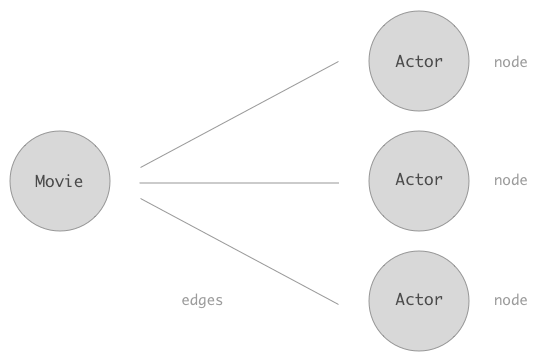
Lastly, we also notice the first: 10 parameter on the actors field. This gives us a way to paginate over the entire list of related actors. In this case we’re taking the first 10 actors (nodes). In the same way we could additionally specify the after parameter which allows us to skip a certain amount of nodes.
Further reading
This was just a brief overview on connections in Relay. If you want to dive deeper please check out the Relay docs on connections or explore the Relay Cursor Connections Specification.
About the author
Søren is a co-founder of Prisma and previously co-founded Graphcool, the GraphQL backend platform that grew into Prisma. Before founding companies he worked as a software architect at Trustpilot, and he has spent well over a decade building tools that simplify how developers work with data. He writes about databases, developer tooling, and the direction of modern application infrastructure.
Keep reading
Agentic Engineering at Prisma
Part of Prisma's agentic software development series on how it ships software with AI agents, covering the process, roles, and documentation layer that make cross-repo agent work possible.

Prisma raises $4.5M to build the GraphQL data layer for all databases
Prisma raised $4.5M to build a GraphQL data layer for databases and shared the vision behind the company's next phase of product development.
Build your next app with Prisma
Start free. Scale when you’re ready.