
Let your coding agent set up Prisma, and decide what needs your approval
Your coding agent can now work in Prisma with a credential of its own, and you decide which of its actions need your approval. Prisma ORM 8, still a release candidate, can now read the Prisma 7 schema of a PostgreSQL project as it is, so you can try it without a rewrite. It also adds full-text search on Postgres. And if you host an app on Prisma Compute, your AI tool can now roll it back and read its logs through the Prisma MCP server.
There are also two deadlines to plan for: Prisma Postgres Early Access databases are deleted on November 1, 2026, and Accelerate is retired on December 1, 2026. If either applies to you, the steps are under "What you need to do" below.
Give your coding agent its own credential and approval rules
You can now enroll a coding agent so it works in Prisma with a credential of its own. Before, an agent used the Prisma CLI on your machine and was signed in as you: it could do everything you can, the audit log showed its actions as yours, and you could only stop it by signing out yourself. An enrolled agent's credential is separate from your account. You can pause or revoke it from Settings → Agents in the Console, and your own access is not affected.
With that credential, the agent can create projects and databases, connect a GitHub repository, and configure deploys through the REST API. The audit log records each of these as the agent's own action.
You also control what the agent may do on its own. By default, it works freely on preview branches, the non-production copies of a project. When it tries to write to production, delete something, or create a connection string, Prisma asks you to approve the request first. These rules cover the requests the agent makes with its credential. A deploy that starts from a pushed commit runs in GitHub Actions, not through the agent's credential, so Prisma does not ask you first. The enrollment guide explains what the policy covers.
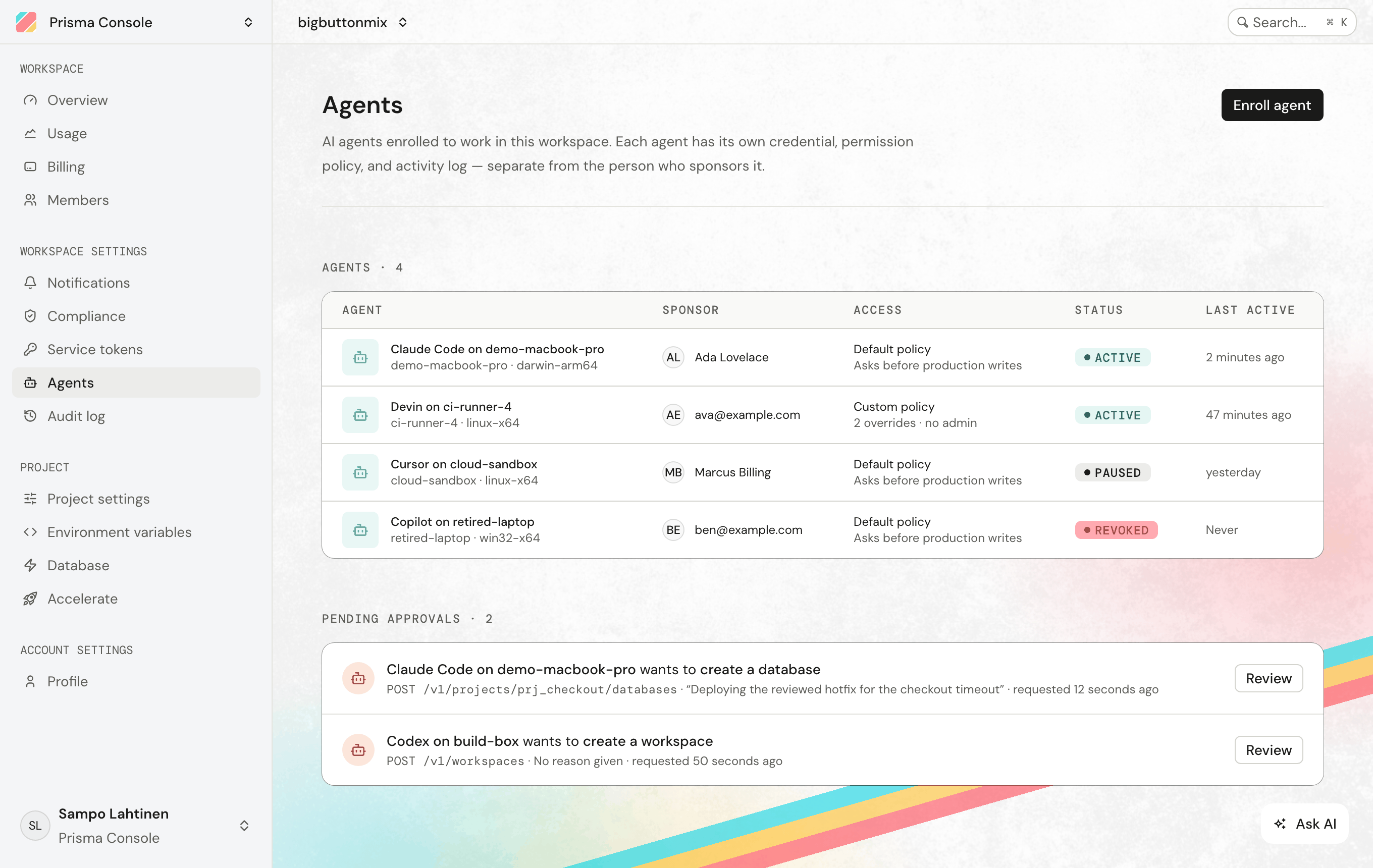
To enroll an agent, open Settings → Agents in the Console and copy the instructions shown there into your agent's chat. The agent shows you a short pairing code. Once you approve that code in the Console, the agent receives its credential. The enrollment guide explains the approval rules in detail and shows an enrolled agent deploying an app.
Try Prisma ORM 8 on your existing Prisma 7 schema
Prisma ORM 8 can now read the schema.prisma file of a Prisma 7 PostgreSQL project as it is. Before, trying it on an existing project meant generating a new schema from your database and fixing it by hand. You can now run both versions side by side on the same database: Prisma ORM 7 keeps running your migrations while you move your code over at your own pace. A few Prisma 7 features, such as views, are not supported yet, and the check described below fails if your schema uses one. (#30287, #30291)
Prisma ORM 8 is still a release candidate, with the final release expected in October 2026. It is already what prisma@latest installs, while Prisma ORM 7 is prisma@prev.
To set this up in a Prisma ORM 7 project, run the command below. Write prisma@latest in full, because a plain npx prisma in your project still runs version 7.
npx prisma@latest orm init --from-prisma7-schema prisma/schema.prismaThe command installs @prisma/orm-postgres and uses it to check that Prisma ORM 8 can read your schema. If the check fails, it stops there. If it passes, it renames the Prisma ORM 7 command-line tool to prisma7, moves its config to prisma7.config.ts, and updates your package scripts to match. It then writes a new prisma.config.ts for Prisma ORM 8 and puts the Prisma ORM 8 client in src/prisma/. Your prisma/ directory and your database are left as they are.
Your schema stays the same, but queries are written differently in Prisma ORM 8:
// Prisma ORM 7
const admins = await prisma.user.findMany({ where: { role: "admin" } });

// Prisma ORM 8
const admins = await db.orm.public.User.where({ role: "admin" }).all();
Here db is the Prisma ORM 8 client and public is the PostgreSQL schema the table is in. Coming from Prisma ORM 7 maps each attribute, command, and query you use today to its name in Prisma ORM 8, and the upgrade guide continues from the command above.
Prisma ORM 8 also has a schema format of its own, which it calls the contract. When you want to stop using the Prisma 7 schema file, prisma contract print prints your schema in that format, or writes it to a file with --output. (#30315)
Roll back and debug Prisma Compute apps from your AI tool
The Prisma MCP server, which connects your AI tool to your Prisma workspace, now works with Prisma Compute. When a deploy goes wrong, you can ask your AI tool to read the deployment's runtime logs and then roll the app back.
The new tools list your apps, builds, and deployments. They can promote a deployment, which makes it the live version of the app, roll an app back, and start, stop, or delete deployments. They can also set environment variables for production, for preview, or for a single preview branch, but they cannot read a value back. For a project built with Composer, which describes an app's services and databases in TypeScript, they can show how those services connect to each other.
Some of these tools change or delete resources, so check which workspace and which app an operation targets before you approve it in your AI tool. The tools work on apps that already exist and cannot build or upload your code. To deploy a new app, follow the Prisma Compute guide. The MCP tools reference describes each tool.
What you need to do
- Prisma Postgres Early Access databases are deleted on November 1, 2026 at 00:00 UTC. These are the databases that still run PostgreSQL 16, and the Console shows a notice on each affected project and database. Move each one to a new database before then. The migration guide walks you through the export and the restore.
- Accelerate is retired on December 1, 2026. If your app connects to Prisma Postgres with a URL that starts with
prisma+postgres://accelerate.prisma-data.net, that connection goes through Accelerate. Before then, switch to a pooled connection or to the serverless driver. Only the connection changes, and your database, your data, and your plan stay as they are. Accelerate's query caching has no replacement, so removecacheStrategyfrom your queries before you switch. - If you use Accelerate with your own database, remove it before December 1, 2026. You can keep your database and connect to it without Accelerate, or, if it is a PostgreSQL database, move it to Prisma Postgres.
- If you are on a Prisma ORM 8 release candidate, read the upgrade guide linked from each release before you create your next migration. The breaking changes below are the ones most apps will run into.
- If you are on Prisma ORM 7, your code does not change, and your project stays on version 7 as long as its
package.jsonasks for version 7. Check any script or CI job that installsprisma@latest, because thelatesttag on npm now points at Prisma ORM 8. Change it toprisma@7. Prisma ORM 7 keeps receiving bug fixes and security updates for 18 months after Prisma ORM 8 becomes generally available, as the release status page explains.
Breaking changes between Prisma ORM 8 release candidates
These apply only if you already use a Prisma ORM 8 release candidate and are upgrading to a newer one. They cover @prisma/orm-postgres and @prisma/orm-mongo from 8.0.0-rc.9 through 8.0.0-rc.14. The prisma command-line tool is released separately, so its version number is different. If you are trying Prisma ORM 8 for the first time, you start on the newest release candidate and can skip this list. The upgrade guide linked from each release gives the steps for each change, and has scripts for some of them, such as the one that adds @@map to your models.
- Table names are no longer changed for you. A model without
@@mapnow uses its name exactly as written, somodel UserProfilereads the table"UserProfile"where earlier release candidates read"userProfile". Before you create a migration, run theadd-model-mapscript from the rc.12 upgrade guide. It adds@@mapwith the current table name to each model, so no table is renamed. (#30317) - Every schema file must start with
// use prisma-8. If your schema is split across several files, Prisma ORM 8 skips a file without this line and gives no warning, so the models in that file go missing. If no file has the line,prisma contract emit, the command that generates your types from the schema, fails withPSL_NO_OPTED_IN_SCHEMA_FILES. This applies to schema files written for Prisma ORM 8. A Prisma 7schema.prismathat you use as described above does not need the line, and the older// use prisma-nextline still counts for now. (#30379) dbgenerated(...)is removed. Write the SQL inside asqltag, as in@default(sql`gen_random_uuid()`). Keep writingnow()andautoincrement()as the named functions. (#30380)- A default must match its column's type. A quoted string no longer works as the default for a JSON, decimal, or float column, so
@default("{}")becomes@default(json`{}`)and@default("1.50")becomes@default(1.50). (#30350) prisma.config.tsmust wrap its config indefinePrismaConfig. The command-line tool no longer exports the older name,defineConfig. ThedefineConfigyou import from@prisma/orm-postgres/configor@prisma/orm-mongo/configkeeps its name, so leave that import as it is. (#30129)- CLI environment variables lose the
NEXT_part of their name.PRISMA_NEXT_DEBUGis nowPRISMA_DEBUG, for example, so rename them in your shell profile, your.envfiles, and CI.PRISMA_NEXT_DISABLE_TELEMETRYstill works, but its new name isPRISMA_DISABLE_TELEMETRY. Prisma Next is the name Prisma ORM 8 was first announced under. (#30262) - A relation must be optional when its foreign key is. If
authorIdisInt?, the relation field has to beauthor User?. Writingauthor Userwas accepted before and now fails, and so doesauthor User?whenauthorIdis required. (#30231) - On the client for serverless runtimes (
postgresServerless),connect()now returns a connection that works like the regular client. It hasdb.orm,db.transaction, anddb.prepare, so code you wrote for the regularpostgres()client works on serverless too. If your code used whatconnect()returned to run queries directly, usedb.runtime()instead, as indb.runtime().query(...),db.runtime().execute(...), andorm({ runtime: db.runtime(), ... }).connect()now opens the connection before it returns, so an unreachable database makesconnect()fail rather than the first query. Reads no longer go through a cursor by default, so deletecursor: { disabled: true }, which no longer compiles. (#30482) - MongoDB schemas written for Prisma ORM 8 no longer accept
@default,@updatedAt, or@db.*. These attributes never had an effect on MongoDB, so remove them. To fill a timestamp when a record is created or updated, give the field the typetemporal.createdAt()ortemporal.updatedAt(). (#30160) - PostgreSQL projects that install with Yarn must add
temporal-polyfillto their dependencies. It is now a peer dependency of@prisma/orm-postgres. npm, pnpm, and Bun install it for you. (#30520) - Relative paths in
prisma.config.tsnow start from the file's own folder. Before,contract,contract.output, andmigrations.dirstarted from the folder you ran the command in, so a script that passes--configfrom another folder may need its paths changed. A project also now takes any setting its ownprisma.config.tsleaves out from aprisma.config.tsin a parent folder, up to the repository root. Addparent: falseto your config to stop this. (#30372) temporal.createdAt()no longer sets a database default. Prisma ORM 8 now fills in the creation time itself. Runprisma contract emit, then create and apply a migration that removes the old database defaults. If you insert rows with raw SQL, those inserts must now set the timestamp. (#30330)- On Postgres, enum columns stored as text sort by their value, not in the order you declared the values. No warning is shown for this. If a query depends on the declared order, for example to sort by priority, the rc.9 upgrade guide shows how to store the enum as numbers instead. A native Postgres enum column keeps the database's own order. (#30223)
- Date and time defaults are stored in one standard form. For example,
@default("2024-01-01T01:00:00+01:00")on aDateTimecolumn is now stored as"2024-01-01T00:00:00Z". Your database does not change. Runprisma contract emitand check whether any default changed. If one did, tell the database about the new contract. If you keep your database in sync withdb update, runprisma db sign. If you use migrations, write an empty migration withprisma migration newand apply it withprisma db migrate. A default that its column cannot hold, such as a UTC offset on aTimestampcolumn, now fails withPSL_INVALID_DEFAULT_LITERAL. (#30532) - Contracts with generated defaults must be emitted again. A contract with defaults such as
temporal.updatedAt()or@default(uuid())now stores them in a new format, and Prisma ORM 8 refuses acontract.jsonin the old one. Runprisma contract emit. The copies of your contract undermigrations/snapshots/need the script from the rc.13 upgrade guide, ormigration planfails withCONTRACT.VALIDATION_FAILED. (#30399) - The function you pass to
db.prepare(...)receives only the parameters. Where you wrote(sql, params) => sql..., write(params) => db.sql.... (#30260) - A default in a TypeScript contract must be a value of the column's type. A TypeScript contract is a schema written in TypeScript instead of a
.prismafile. For example,field.dateTime().default("2024-01-01T00:00:00Z")is now a type error, because that column holds aTemporal.Instant, not a string. (#30433) - On MongoDB, a
Jsonfield holds only JSON values. Reading a document fails when the field holds aDate, anObjectId, or another value that is not JSON. For a field that can hold any MongoDB value, use the newBsontype. (#30439)
Deprecations
- Accelerate is retired on December 1, 2026, including Prisma Postgres connections that go through it. The Console no longer offers Accelerate for new setups. If you already use it, the Accelerate page in the Console has a Transition tab that links the guide for your database.
- In Prisma ORM 8 schemas for MongoDB, the type names
Int,Float,Boolean, andDateTimeare deprecated. UseInt32,Double,Bool, andDate, which match what MongoDB stores. The old names still work for now and print a warning. (#30396) - In Prisma ORM 8, the schema header
// use prisma-nextis deprecated in favor of// use prisma-8. The old header still works, and formatting the file in your editor rewrites it for you. (#30262) - In a TypeScript contract,
.defaultSql("...")is deprecated and is removed in the final 8.0.0 release. Write.default(now()),.default(autoincrement()), or.default(sql`...`)instead. (#30325)
Prisma Compute
You can now change an environment variable in the Console and apply it to your running apps without rebuilding them. On a project's Environment page, edit a value in place. Your edits are held until you click Save changes, which saves all of them at once. After saving, the Console offers to deploy the change to each live app.
Apps connected to GitHub also have a Deploy latest commit button on the app page, for when you want a deploy without pushing a commit. If your deploy workflow was created before this release, the button cannot start it until you add workflow_dispatch to the workflow's triggers:
on:
  push:
  workflow_dispatch:
Connecting a repository takes fewer steps as well:
- If the repository already has a Composer config, its first deploy starts as soon as you connect it.
- A server that calls
Bun.servedirectly, with no framework, can now be deployed from GitHub. - When setup fails, Retry tries again on the same repository instead of sending you back to the repository picker.
- If your personal GitHub account already has the Prisma GitHub App installed, you can now connect it to a workspace.
You can also delete a project while it still has active deployments, and deleting the project removes them. In the Console, uploads to Object Storage accept files up to 1 GB, and you can delete a folder along with everything in it.
The docs have a new page on the request timeout. Your service has 60 seconds to start responding. Once a response has started, as with a stream, it is not cut off when it passes 60 seconds.
Prisma ORM
Prisma ORM 8 now has full-text search on Postgres. A text field has fullTextMatches to filter and fullTextRank to sort by relevance, and adding @@fullTextIndex to the model lets Postgres use an index for the search. You pass the user's search text through websearchToTsquery, which understands quoted phrases, or, and a leading - the way a web search box does. Passing a plain string by mistake is a type error. The reference covers the other ways to build a search and the language option. (#30348, #30386)
import { websearchToTsquery } from "@prisma/orm-postgres/target/full-text";

const q = websearchToTsquery(input);

const posts = await db.orm.public.Post.select("id", "title")
  .where((p) => p.title.fullTextMatches(q))
  .orderBy((p) => p.title.fullTextRank(q).desc())
  .all();
The release candidates also add the following:
- Skip duplicates when you insert many rows.
createAllandcreateAndCountare whatcreateManybecame in Prisma ORM 8. Pass them{ onConflict: "skip" }, and rows that would break a unique constraint are left out. This replacesskipDuplicatesand works on Postgres and SQLite. (docs, #30365) - Sort by related data.
orderBycan sort by a field of a related record, as inpost.author.name.asc(), or by how many related records there are, as inuser.posts.count().desc(). You can also say whether nulls come first or last. (docs, #30402) - Split your schema across several files. Set the
contractoption inprisma.config.tsto a pattern such as./prisma/**/*.prisma, and every matching file that starts with// use prisma-8becomes part of one schema. Your editor reads those files as one project too. (#30379, #30456) - Use named types for your models and results. Prisma ORM 8 now generates a type for each model, such as
Models.public_User, andShapebuilds a response type from the fields and relations you pick. These replacePrisma.UserandUserGetPayloadfrom Prisma ORM 7. To get them, runprisma contract emitafter upgrading. It generates the types the wayprisma generatedid. (#30231) - Build an ORM query once and run it many times.
db.prepare(...)builds a query once and then runs it with new values each time. It used to accept only queries written with the SQL query builder, and it now accepts ORM reads and aggregates too. The docs have an example. (docs, #30260, #30309) - Work with JavaScript
Datevalues on Postgres. In a Prisma ORM 8 schema on Postgres, a field declared asDateTimereaches your code as aTemporal.Instant. If you would rather have aDate, declare the field asTimestamptzJsDate. ADateis precise to the millisecond, so anything finer is lost. (#30288) - Store more MongoDB types. A MongoDB schema can declare
Int64,Decimal128,Binary,Json, andBsonfields. It can also declare timestamps that are filled in when a record is created or updated. (#30396, #30403, #30439) - Complete schema attributes in your editor. The editor now suggests attribute names and their arguments, and shows what each argument expects as you type. (#30249, #30312)
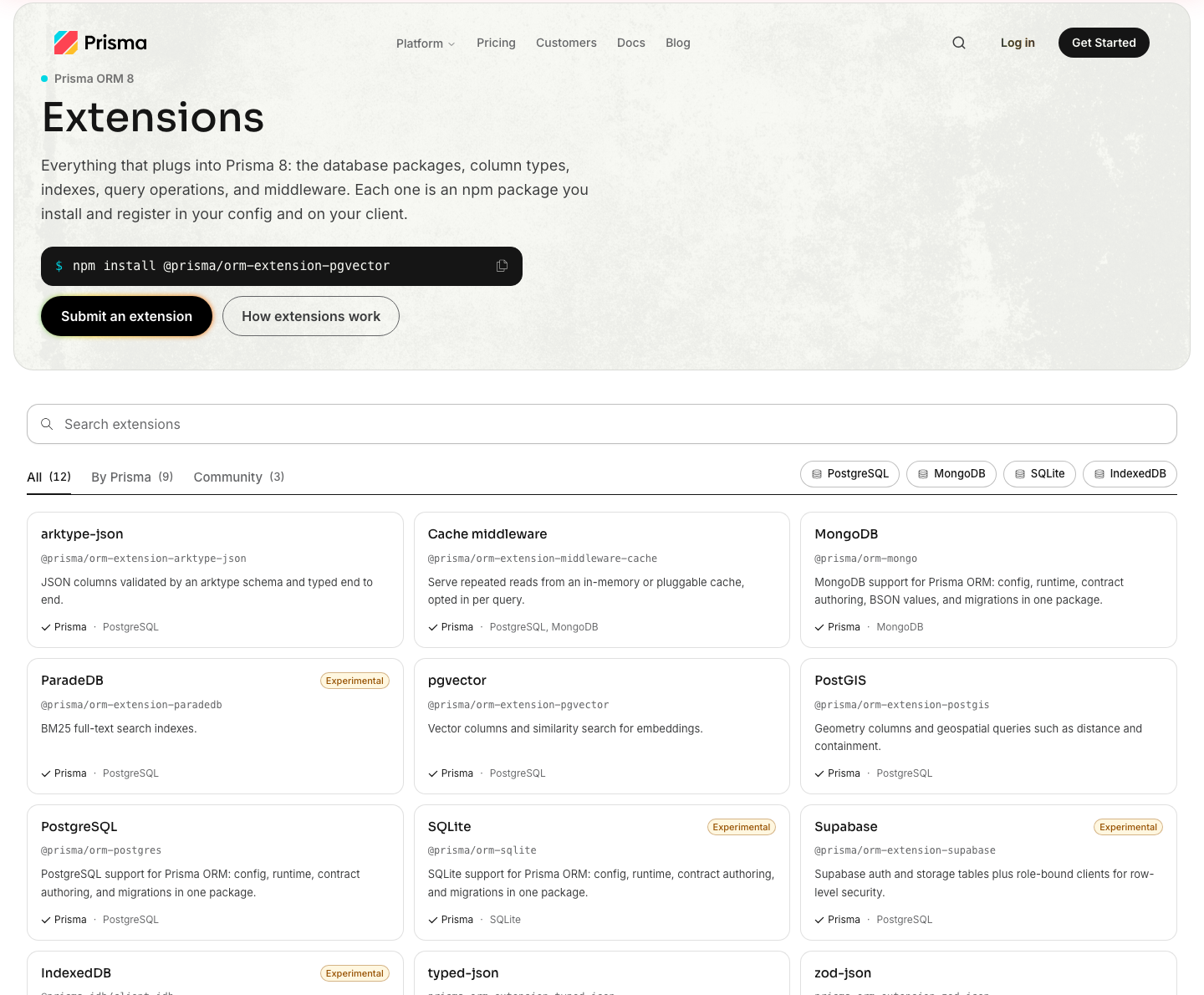
Prisma ORM 8 extensions now have a directory. The extension directory lists extensions and middleware packages from Prisma and from the community, each with its install command. To add your own, submit it from the page, which opens a pull request for you.
Prisma Postgres
The docs for the Prisma Postgres serverless driver now say when to use it. It is for an edge runtime that cannot open a TCP connection, where it connects over HTTP and WebSockets. On a regular Node.js or Bun server, a pooled TCP connection is the recommended choice.
The Console's page for creating a database used to ask you to choose between Prisma Postgres and Accelerate. It now goes straight to creating a Prisma Postgres database, which comes with connection pooling and backups.
REST API
- Services, databases, and Object Storage buckets now have an optional
logicalId, an identifier you choose so your own tooling can tell which resource is which. You set it when you create or update the resource, and you remove it by setting it tonull. PATCH /v1/buckets/{bucketId}changes an Object Storage bucket's display name, itslogicalId, or the project branch it belongs to. Before, changing any of these meant replacing the bucket.- When a request fails because you reached a plan limit, the error now has the code
quota-exceeded. A plan limit and a resource conflict both return409, so the code is how you tell them apart. - Creating a database with
region: "inherit"now uses the project's default region. Before, the region was taken from the project's default database, so the request failed with a422on a project that had none. - The OpenAPI spec is now at
/openapi.json, so API tools and agents can find it at a standard path.
Prisma Console
When you downgrade from one paid plan to another, the change now takes effect at the end of the billing period, and you keep your current plan until then.
On the invoice, Accelerate charges now have their own section. They used to be added to your Prisma Postgres usage, where they could look like an overage. The workspace overview also estimates your Prisma Compute requests for the rest of the billing cycle, as it already did for Prisma Postgres operations.
When you create an account, the first screen now lets you start from a template, from a GitHub repository, or from an empty project.
Docs and website
- One search now covers the website, the docs, and the blog. It opens from the same dialog on all three, and you can filter the results by where they come from.
- Agents can read the website as Markdown. The main product pages now answer with Markdown when an agent asks for it, and ChatGPT can now open the Markdown versions of the docs pages.
- If you are moving to Prisma ORM 8, two new pages help: release status says where the release stands and how to stay on version 7, and the from-scratch setup builds a project by hand, with no template.
- Right-click the Prisma logo in any header to copy the logo or download the brand assets.
Fixes
Prisma Compute
- A project that you connect from GitHub now deploys in the region you chose. Your choice was dropped before, and the project deployed in US East.
- The project overview now shows builds that ran in GitHub Actions.
- The new-project form preselects a region near you again.
Prisma Postgres
- Restoring a database from a backup you pick no longer fails with
No backups found. - The pricing calculator now uses the Free plan's limit of 200,000 operations.
Prisma ORM 8
- When a foreign key or a primary key had more than one column, Prisma ORM 8 matched rows on the first column only.
include()could return related records that belonged to a different parent, and anupdate()with a nested write could change every row that shared that first column. On a model that extends another,updateAndCount()anddeleteAndCount()could change or delete those rows too. All of these now match on every column. (#30107) db signis the command that tells Prisma ORM 8 an existing database already matches your schema. After you run it,migration plannow proposes only your next change. It used to propose recreating every table. (#30251)- On Postgres, a query whose results you have not finished reading no longer holds on to a pooled connection, so it cannot block other queries when the pool is small. If you turn on the
cursoroption, a query still holds its connection until you finish reading. (#30259) - Each migration keeps a copy of your contract, the
contract.jsonfile thatprisma contract emitwrites from your schema, undermigrations/snapshots/. On Postgres and SQLite, if one of those copies is edited by hand,migration planand the other commands that read it now stop with an error, andmigration checkreports the edited file. Before,migration plancould report that there was nothing to change. (#30086) db init,db update,db migrate, anddb signno longer need the generatedcontract.d.tsfile to exist, and neither domigration planandmigration new. Before, if the file was missing,db initanddb updatecould change the database and then stop with an error. (#30293, #30298)- A migration that removes a column no longer fails when it also removes a row-level security policy that references that column. (#30232)
- On Node 24, commands such as
contract emitanddb updatefailed when a Postgres schema had a date or time default. They now work. (#30520) createAndCountreturns the number of rows the database inserted. It used to return the length of the input. (#30365)limit()andoffset()now reject a value such asNaNwith an error. Before, the value was written into the SQL. (#30133)- Ordering by a native Postgres enum column no longer fails. (#30191)
- On MongoDB, a query that combines
select()withinclude()now returns the included relations. (#30170) - On MongoDB, a connection string that lists several hosts is now accepted, and the CLI masks its credentials in its output. (#30354)
- The editor could show errors on a schema that was valid, including one that
prisma orm inithad just generated. It no longer does. (#30228) - On an empty migrations folder,
migration plancould write a first migration that drops tables or columns without asking. It now asks you to confirm first, asdb updatedoes. (#30084) contract inferprinted a Postgres array column that allowsNULLas required, asString[]instead ofString[]?. It now prints the?. (#30313)- Reading a column that holds an array of a native Postgres enum failed with a
TypeError. It now returns the values. (#30235) - When two PostgreSQL schemas in your Prisma schema each had a model with the same name, a relation could point at the table in the other schema. It now points at the one in its own schema. (#30478)
- On MongoDB, writing a whole number to a
Doublefield failed withDocument failed validation, anddb updatecould not apply a change that needed your confirmation. Both now work. Awhere()filter whose value was sent as a different type from the field's used to match nothing, and it now matches. (#30519)
Guides and articles
- Prisma ORM Manifesto 2026: Open, Extensible, Collaborative: the five principles behind Prisma ORM 8.
- Is Prisma 8 Ready for Long-Lived Production Apps?: Prisma ORM 8's lead developer responds to three concerns raised in a Reddit thread.
- The new way to use Prisma ORM 8 in NestJS: one shared client and plain query helpers replace the
PrismaClientservice. - Where to host a TypeScript frontend, a Node API, and Postgres: Railway, Render, Fly.io, and Prisma compared for one repository.
- Choosing hosting and Postgres after your first 100 paying users: a scaling checklist, with Postgres costs worked out at 100, 1,000, and 10,000 users.
- Neon vs Prisma Postgres when you want hosting and the database in one place: previews, connections, idle cost, and restores compared, and when Neon is the better pick.
- Prisma vs Vercel and Prisma vs Netlify: how Prisma compares with each as the place to build a TypeScript app.
Need help applying these changes in production? Prisma Enterprise Support can help with schema design, performance, security, and compliance.