Introduction
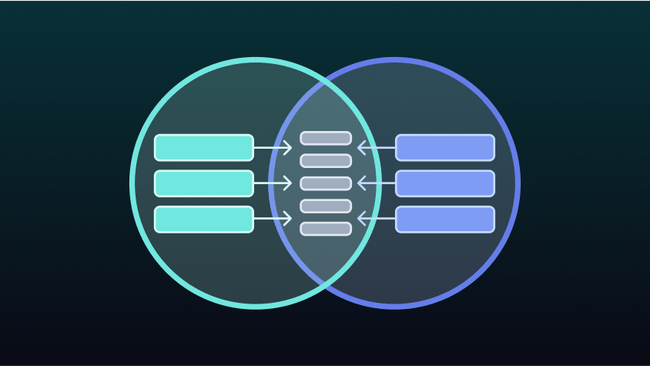
JOINs allow you to combine related data from multiple tables in relational databases. Read on to learn more about what they are, how they work, and how you can utilize them effectively for different relations.
How data is structured in relational databases
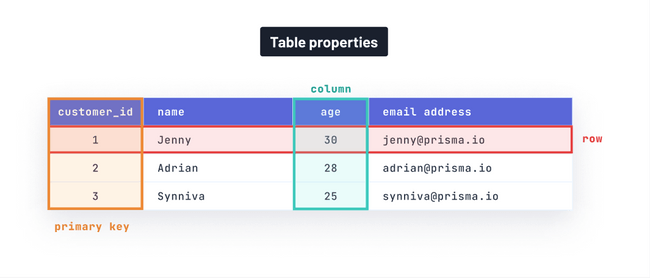
Before diving into JOINs, it’s important to understand the fundamentals of relational databases. Relational databases provide a way to structure and organize information. In relational databases, data is structured into tables, with columns (attributes) specifying data types (think strings, integers, etc.) and rows containing records (the values for each of the table’s columns).
Let’s demonstrate this concept with a table holding customer information. In the table below, the columns, or customer attributes, are name, age, and email address and the rows represent each customer’s name, age, and email_address.
| name | age | email_address |
|---|---|---|
| Jenny | 30 | jenny@prisma.io |
| Adrian | 28 | adrian@prisma.io |
| Synniva | 25 | synniva@prisma.io |
A relational database has the ability to define relationships, or connections, between different tables using primary and foreign keys.
It is common for tables in a relational database to have a column known as the primary key which uniquely identifies each row. To see how this works in practice, let’s use our previous example: The primary key for the customers table would be a column of unique IDs for each customer, called customer_id. In other words, no customer would share the same ID as another.
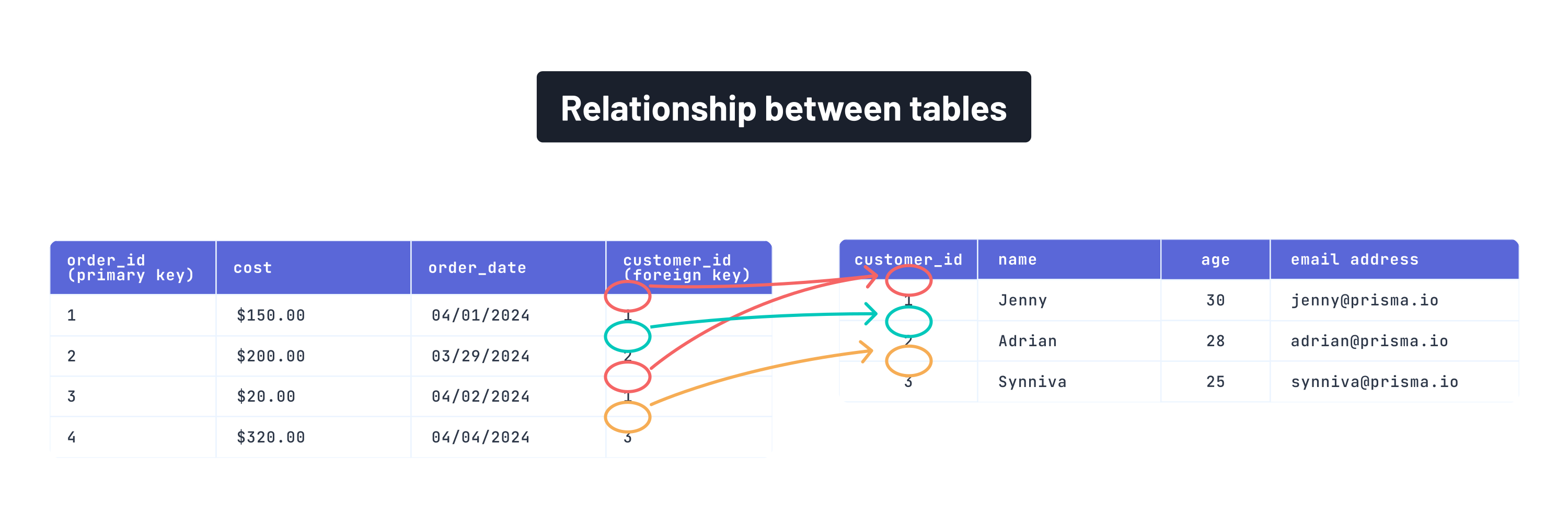
A foreign key is used to create a relationship between tables by referencing the primary key of another table. To demonstrate the concept of foreign keys, let’s say we have another table called orders with columns: order_id, cost, and order_date. We can link the orders table (left table in diagram) with the customers table (right table in diagram) by including a customer_id column (foreign key), associating each order with the corresponding customer.
What are JOINs?
A useful feature of relational databases is the concept of JOINs, a type of SQL operation that combines relevant data from distinct tables often based on the primary and foreign key.
The basic syntax of a JOIN operation is as follows:
Here is what each part of the query means:
SELECT: specifies which columns you would like to include from the resulting dataset. In our case, it selects all (*) columns from the resulting dataset.FROM: specifies the source table from which data will be retrieved. In our case, it is the first table.<join_type>: specifies the specific type of JOIN operation you want to perform with the second table.<join_condition>: represents how the two tables should be joined. It typically consists of equality comparison between columns from the two tables.
Using our example from earlier, when you perform a standard JOIN between the customers and orders tables, the database looks for matching values in the customer_id column of the orders table (foreign key) and the customer_id column of the customers table (primary key). It then combines the rows where these values match into a single result set.
Here is an example query:
Here is the result set based on the associated query:
| customer_id | name | age | email_address | order_id | cost | order_date |
|---|---|---|---|---|---|---|
| 1 | Jenny | 30 | jenny@prisma.io | 1 | $150.00 | 4/1/2024 |
| 2 | Adrian | 28 | adrian@prisma.io | 2 | $200.00 | 3/29/2024 |
| 1 | Jenny | 30 | jenny@prisma.io | 3 | $20.00 | 4/2/2024 |
| 3 | Synniva | 25 | synniva@prisma.io | 4 | $320.00 | 4/4/2024 |
The result set combines the columns from both the orders table and customers table based on the matching rows from the customer_id column. This allows you to see order information alongside the customer information.
Types of JOINs in PostgreSQL and MySQL
Sometimes you may want to get different rows from each table. There are different types of JOIN operations that will help you achieve this. In this section, we will discuss traditional JOINs supported by MySQL and PostgreSQL (two relational databases) as well as lateral JOINs (only supported by PostgreSQL).
Traditional JOINs
The most common form of JOIN operations you will encounter are INNER JOIN, LEFT JOIN, RIGHT JOIN, FULL JOIN, and CROSS JOIN. To demonstrate these JOIN types, we will use the following customers and orders (modified) tables:
| customer_id | name | age | email_address |
|---|---|---|---|
| 1 | Jenny | 30 | jenny@prisma.io |
| 2 | Adrian | 28 | adrian@prisma.io |
| 3 | Synniva | 25 | synniva@prisma.io |
| order_id (primary key) | cost | order_date | customer_id (foreign key) |
|---|---|---|---|
| 1 | $150.00 | 4/1/2024 | 1 |
| 2 | $200.00 | 3/29/2024 | 2 |
| 3 | $20.00 | 4/2/2024 | 1 |
INNER JOIN
The INNER JOIN is the default JOIN and returns rows from both tables only where there is a match. Here is the associated query for the customers and orders table:
Here is the result table after using an INNER JOIN:
| customer_id | name | age | email address | order_id | cost | order_date |
|---|---|---|---|---|---|---|
| 1 | Jenny | 30 | jenny@prisma.io | 1 | $150.00 | 4/1/2024 |
| 1 | Jenny | 30 | jenny@prisma.io | 3 | $20.00 | 4/2/2024 |
| 2 | Adrian | 28 | adrian@prisma.io | 2 | $200.00 | 3/29/2024 |
When depicted as a Venn diagram, an INNER JOIN represents the overlapping region of the two circles. In other words, only the values existing in both tables are included.

LEFT JOIN
A LEFT JOIN returns all rows found using the INNER JOIN and all records from the first table. Here is the associated query for the customers and orders table:
Here is the result table after using a LEFT JOIN:
| customer_id | name | age | email address | order_id | cost | order_date |
|---|---|---|---|---|---|---|
| 1 | Jenny | 30 | jenny@prisma.io | 1 | $150.00 | 4/1/2024 |
| 1 | Jenny | 30 | jenny@prisma.io | 3 | $20.00 | 4/2/2024 |
| 2 | Adrian | 28 | adrian@prisma.io | 2 | $200.00 | 3/29/2024 |
| 3 | Synniva | 25 | synniva@prisma.io | NULL | NULL | NULL |
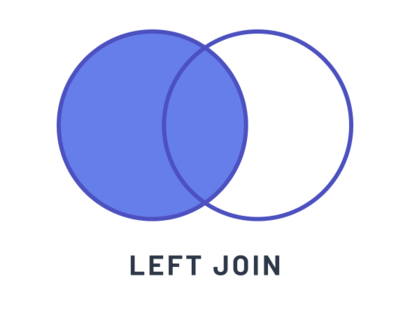
When depicted as a Venn diagram, a LEFT JOIN represents the entire left circle. In other words, the matching values from both tables will be included along with all records from the customers table.
RIGHT JOIN
A RIGHT JOIN returns all rows found using the INNER JOIN and all records from the second table. Here is the associated query for the customers and orders table:
Here is the result table after using a RIGHT JOIN:
| customer_id | name | age | email address | order_id | cost | order_date |
|---|---|---|---|---|---|---|
| 1 | Jenny | 30 | jenny@prisma.io | 1 | $150.00 | 4/1/2024 |
| 1 | Jenny | 30 | jenny@prisma.io | 3 | $20.00 | 4/2/2024 |
| 2 | Adrian | 28 | adrian@prisma.io | 2 | $200.00 | 3/29/2024 |
In this case, the result is the same as an INNER JOIN as each order has a corresponding customer.
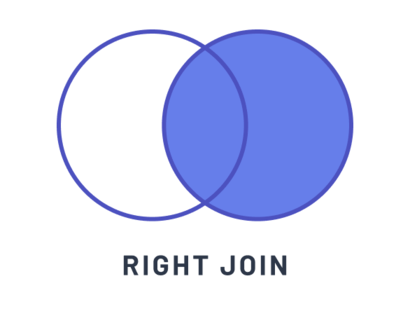
When depicted as a Venn diagram, a RIGHT JOIN represents the entire right circle. In other words, the matching values from both tables will be included along with all records from the orders table.
FULL JOIN
A FULL JOIN returns all rows when there is a match in either table. Here is the associated query for the customers and orders table in PostgreSQL:
MySQL does not natively support FULL JOINs. As a workaround, we can use a LEFT JOIN combined with an “anti-JOIN,” which is a JOIN operation that finds results that are not in common between tables (specified by the NULL). The UNION ALL allows us to combine these together.
Here is the result table after using a FULL JOIN:
| customer_id | name | age | email address | order_id | cost | order_date |
|---|---|---|---|---|---|---|
| 1 | Jenny | 30 | jenny@prisma.io | 1 | $150.00 | 4/1/2024 |
| 1 | Jenny | 30 | jenny@prisma.io | 3 | $20.00 | 4/2/2024 |
| 2 | Adrian | 28 | adrian@prisma.io | 2 | $200.00 | 3/29/2024 |
| 3 | Synniva | 25 | synniva@prisma.io | NULL | NULL | NULL |
In this case, the result would be the same as a LEFT JOIN as every record from the customers table has a match in the orders table.
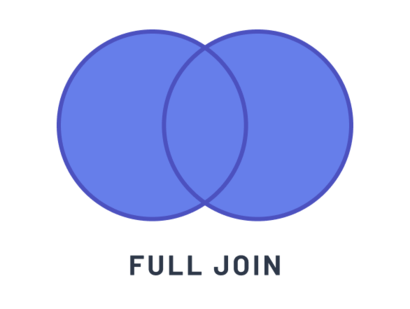
When depicted as a Venn diagram, a FULL JOIN represents both circles. In other words, a FULL JOIN combines all records from both tables.
CROSS JOIN
A CROSS JOIN returns the Cartesian product of the two tables, meaning every row from the first table is combined with every row from the second table. In this syntax, the result is formed by adding each of the rows in the first table with each of the rows from the second table like so:
Note: In MySQL, the concept of a
CROSS JOINis combined with theINNER JOIN. Read more in the data guide.
With a CROSS JOIN, each row from the customers table is combined with each row from the orders table, resulting in a total of 9 rows. However, we won’t show the result table as a CROSS JOIN wouldn’t accurately pair the customer with their respective orders.
To learn more about database-specific details of JOIN operations, check out these additional pages in the data guide:
LATERAL JOINs
Lateral JOINs offer a different syntax to combining tables compared to traditional JOINs. In a LATERAL JOIN, the second table is presented as a subquery, and the JOIN criteria is defined within the WHERE clause of the subquery.
According to the PostgreSQL docs:
“The
LATERALkey word can precede a sub-SELECT FROMitem. This allows the sub-SELECTto refer to columns ofFROMitems that appear before it in theFROMlist. (WithoutLATERAL, each sub-SELECTis evaluated independently and so cannot cross-reference any otherFROMitem.)”
In other words, a LATERAL JOIN is like a foreach loop, where PostgreSQL iterates over each row in a result set and uses each row to evaluate the subquery.
Here is the associated query for the customers and orders table:
Here is the result table after using a LATERAL JOIN:
| customer_id | name | age | email address | order_id | cost | order_date |
|---|---|---|---|---|---|---|
| 1 | Jenny | 30 | jenny@prisma.io | 1 | $150.00 | 4/1/2024 |
| 1 | Jenny | 30 | jenny@prisma.io | 3 | $20.00 | 4/2/2024 |
| 2 | Adrian | 28 | adrian@prisma.io | 2 | $200.00 | 3/29/2024 |
| 3 | Synniva | 25 | synniva@prisma.io | NULL | NULL | NULL |
In this case, the result would be the same as a LEFT JOIN and FULL JOIN.
Note:
LATERAL JOINs are supported by Postgres but only supported in MySQL versions >8
💡 Prisma ORM makes it easy to query relations between tables without thinking about the intricacies and low-level complexities of SQL operations. Read the docs to learn more about relation queries.
Implementing JOINs for different relations
It’s important to understand database relations when selecting the appropriate JOIN type. In the context of databases, relations describe a relationship between tables in a database.
In this section, we will illustrate both the one-to-one and the one-to-many relations along with considerations for selecting the appropriate JOIN type for each.
One-to-one (1-1)
In a one-to-one relation, each record in one table is associated with exactly one record in another table, and vice versa. Here is an example SQL schema demonstrating a one-to-one relation between customers and profiles tables:
In this example, we use the unique field (email) from the customers table as a foreign key (customer_email) in the profiles table. This is possible because each email uniquely identifies a customer. This represents a one-to-one relation because each customer can have only one profile, and a profile can belong to only one customer.
In one-to-one relations, JOINs are straightforward. You can use a traditional INNER JOIN to combine the customers with their profiles. Here is an example query:
When performing an INNER JOIN between the two tables, we would get a result set where each row contains columns from both tables, matched based on the relationship criteria. Here is an example result set:
| id | name | gender | age | |
|---|---|---|---|---|
| 1 | meera@prisma.io | Meera | Female | 30 |
| 2 | xander@prisma.io | Xander | Male | 30 |
| 3 | zara@prisma.io | Zara | Female | 32 |
| 4 | artemis@prisma.io | Artemis | Male | 32 |
When you join the customers and profiles tables using the INNER JOIN and the specified join condition, each row in the result set represents a customer along with their corresponding profile. In other words, we include the id and email columns from the customers table, along with the name, gender, and age of those customers from the profiles table.
One-to-many (1-n)
In a one-to-many relationship, each record in one table can be associated with multiple records in another table. Here is an example SQL schema demonstrating a one-to-many relation between users and posts tables:
This means that one user can have multiple posts, but each post is linked to only one user.
When dealing with one-to-many relations, traditional JOINs can lead to duplicated data. Consider the following query:
Here is an example result set based on the query above:
| id | post_id | post_title | |
|---|---|---|---|
| 1 | jenny@prisma.io | 1 | Introduction to Prisma ORM |
| 1 | jenny@prisma.io | 2 | Introduction to JOINs |
| 1 | jenny@prisma.io | 3 | Introduction to SQL |
| 2 | meera@prisma.io | 4 | Using Prisma Client |
As you can see in the result set, Jenny's email and id get duplicated over multiple rows for each of her posts. As we incorporate more nested relations, result sets may become bloated with redundant data. This makes the query less efficient (because it requires more bandwidth for the transmission of the results) and can make it harder to interpret the data.
To address this duplication, we can pair LATERAL JOINs with JSON aggregation. JSON aggregation helps avoid duplication by consolidating multiple related records into a single field as a JSON array, while LATERAL JOINs help improve readability and can optimize performance.
Here is an example of what the result set would look like using LATERAL JOINs with JSON aggregation:
| id | post_titles | |
|---|---|---|
| 1 | jenny@prisma.io | [{"post title": "Introduction to Prisma ORM"}, {"post title": "Introduction to JOINs"}, {"post title": "Introduction to SQL"}] |
| 2 | meera@prisma.io | [{"post title": "Using Prisma Client"}] |
As you can see, LATERAL JOINs combined with JSON aggregation leads to a cleaner result set with no unnecessary duplication. Each of Jenny’s posts got consolidated into a JSON array, transforming three rows from the previous result set into one.
Note: A many-to-many (m-n) is not discussed in this context because it describes two 1-n relations and hence would be supported with the same type of JOIN
Conclusion
To wrap up, we introduced the concept of JOINs and how they allow us to combine related data from tables in relational databases. We explored how data is organized in relational databases, and the significance of primary and foreign keys in forming relationships between tables. We then discussed different types of joins in MySQL and PostgreSQL and determined the appropriate type of join, whether it be traditional or lateral, to use for both one-to-one and one-to-many relations.
💡 JOINs can be very complicated in real-world applications, especially if you add more conditions to a query, e.g. filtering and pagination. Prisma ORM lets you easily query relations and figures out an effective JOIN query for you under the hood. Read the docs to learn more about relation queries.